Claude Code vs Cursor: 90 Days With Both in 2026
I used Claude Code and Cursor side by side for three months on production work. Here is where each one wins, where it loses, and the one I kept.
If you are reading this, you have probably already tried one of them and are wondering whether the other is worth a switch. The short answer is that Claude Code and Cursor are not really competing for the same job, even though they look like they are. One lives in your terminal and behaves like a junior engineer with shell access. The other lives inside an editor and behaves like a very fast pair programmer sitting next to you.
I ran both on real work for ninety days. Some of it was a Next.js client project, some of it was a Python data pipeline, and a fair amount was housekeeping in this very blog. The picture that came out of that is more nuanced than the comparison posts I had read going in.
Claude Code is better when the task is large and the work happens across many files. Cursor is better when the task is small and you need to stay in the file you are looking at. Most people end up using both for different reasons.
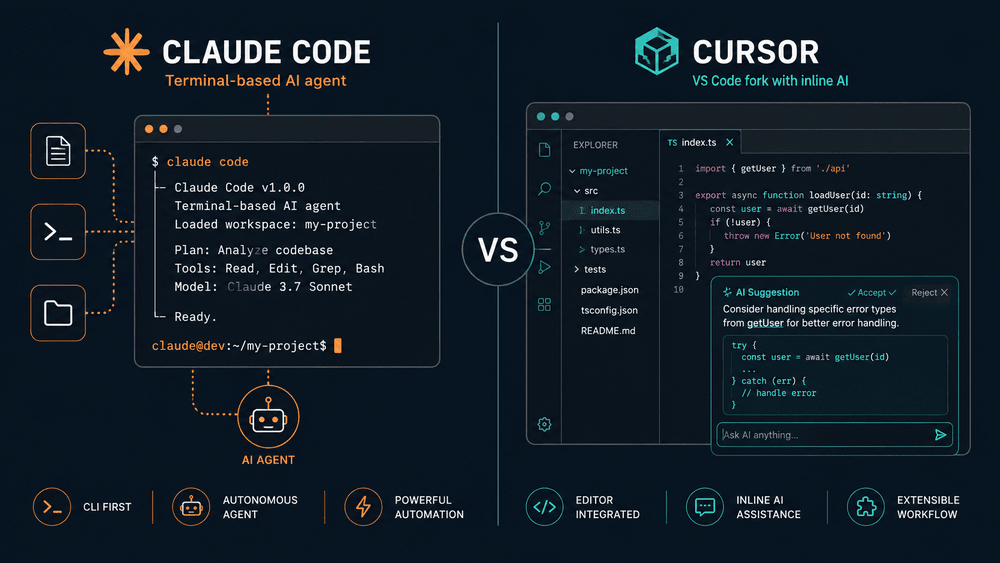
What they actually are
Before any comparison, it is worth being clear about what each tool is. A lot of confusion in this space comes from treating them as interchangeable.
| Claude Code | Cursor | |
|---|---|---|
| Form | Terminal CLI (plus IDE extension) | Forked VS Code editor |
| Where the model runs | Anthropic Claude (Opus 4.7, Sonnet 4.6, Haiku 4.5) | Multi-model: Claude, GPT, Gemini, plus their own |
| Default working mode | Agentic — it reads, plans, edits, runs commands | Inline completion + chat + agent mode |
| Pricing | Pro $20 or Max $200/mo subscription, plus API credits | Pro $20/mo, Ultra $200/mo, free tier available |
| Best for | Multi-file refactors, repo-wide work, CI tasks | Single-file edits, fast iteration, learning a new codebase |
| Setup time | Two minutes (npm install -g @anthropic-ai/claude-code) | Download installer, sign in |
Cursor is an editor. Claude Code is an agent. That single sentence explains most of the differences below.
The mental model that matters
Cursor is built on top of VS Code, so almost everything you already know about editing code still applies. You open a folder, you see files in a sidebar, you press a key combination and a chat panel opens. The chat can edit the file you are looking at, propose changes you accept or reject, or run a small agent loop. The whole thing is shaped around the document you have open.
Claude Code is a different shape. You launch it in a directory, you describe a task in plain English, and it goes off and does the work. It reads files. It runs grep. It edits multiple files in one turn. It can run your tests, see the failures, and try again. The unit of work is not a file. The unit of work is a task.
This difference shows up in everything that comes next. Cursor wants you to stay in the loop on every edit. Claude Code wants you to define the goal and step away. Neither one is wrong. They are answering different questions about what AI coding should feel like.
Where Cursor wins
I want to be honest about this because the internet has decided Claude Code is the winner and Cursor is yesterday’s news. That is not what I saw.
Inline completions are still faster
Cursor’s tab-complete is the best in the category. When you are typing and the suggestion appears in line with your code, your hands never leave the keyboard. For the kind of small edit where you already know what you want and you just need the boilerplate filled in, this is faster than any agent loop. Claude Code can do it, but you have to type out a request first, and that overhead beats you on small edits.
Reviewing diffs in a real editor
When Cursor proposes a change, it shows up in the editor as a diff you can accept hunk by hunk. You see exactly what is happening, you can reject one block while accepting another, and your finger is already on the keyboard shortcut. Claude Code can show diffs too, but the terminal is a worse place to read them. For a five-line change in a file you already understand, Cursor’s diff review is just nicer.
Working in unfamiliar codebases
When I joined a new project for a client, I opened it in Cursor first. Being able to right-click a function and ask “what does this do” while I was looking at it was the fastest way to learn the shape of the repo. Claude Code can answer the same question, but I have to describe what I am pointing at instead of just pointing at it.
Multi-model choice
Cursor lets you switch models per request. Some days I want Claude Opus 4.7 because the task needs careful reasoning. Other days I want a cheaper model because I am running fifty small tasks and the cost adds up. Cursor gives you that knob. Claude Code does too within the Anthropic family, but Cursor lets you mix and match across providers, which matters if you have credits with more than one.
Where Claude Code wins
These are the cases where I would not even open Cursor. The gap is large enough that there is no contest.
Large refactors across many files
The first time Claude Code paid for itself was a migration job. I had to rename a config option across thirty-eight files, update the types, fix every test, and add a deprecation notice in the old name. In Cursor I would have done this with a series of search-and-replace operations and a lot of manual cleanup. In Claude Code I described the task in two sentences and walked away for ten minutes. When I came back, it was done and the tests were passing.
For anything that touches more than four or five files, the agent loop is the right shape. You stop being a typist and start being a reviewer. That shift is the real product.
Long-running work you can leave alone
Claude Code can run for thirty or forty minutes on a single task without losing the thread. It plans, executes, hits errors, debugs, and finishes. The recent Ultraplan feature pushes this further by separating planning from execution so the long-running work happens in the cloud while you keep typing.
Cursor’s agent mode can do similar work but I have never gotten a clean half-hour run out of it. It stops to ask questions or loses context. Claude Code is more comfortable with autonomy.
Hooks, skills, plugins, and subagents
This is the part of Claude Code that surprises new users. The system is built to be extended. Hooks let you run shell commands on every tool use. Skills let you bundle expertise into folders Claude loads on demand. Subagents handle the heavy work in side processes. Plugins package all of this for distribution.
Cursor has rules and some extension hooks, but the surface area is smaller. If you want to teach your AI assistant the conventions of your team in a way that survives across sessions, Claude Code gives you more places to put that knowledge.
Running in CI and headless environments
Because Claude Code is a CLI, it runs anywhere a shell runs. You can drop it into a GitHub Action and have it review pull requests. You can run it on a server. You can pipe data into it. Cursor is an editor, so it lives where editors live, which is a developer’s laptop. For team automation, this is a real gap.
Working without leaving the terminal
If you spend most of your day in tmux, vim, or some other terminal-first setup, Claude Code feels like it was built for you. You never have to switch to a graphical environment to get AI help.
Real cost over three months
People hand-wave about cost. Here are the numbers I actually saw.
| Tool | Plan | Months | Real spend |
|---|---|---|---|
| Cursor | Pro $20/mo | 3 | $60 (the subscription, no overages) |
| Claude Code | Max $200/mo | 3 | $600 |
| Total | $660 |
The Claude Code spend looks high until you compare it to what those tasks cost in human hours. The refactor I mentioned above would have taken me a full day. Claude Code did it for the marginal cost of about eight dollars of compute. Across three months it saved me what I would conservatively estimate at sixty hours of focused work.
If you are an individual on a tight budget, Cursor Pro at $20 is the better starting point. If you are billing client work and your time is worth more than $50 an hour, Claude Code pays for itself inside the first project.
A note on the Max plan: it caps usage at five times what Pro does, with priority access during high load. Most people do not need it. Start with Pro and upgrade only when you see real friction.
Speed, reliability, and the small things
I tracked a few things in a simple notebook during the trial. Some of what I expected was wrong.
Cold-start latency. Cursor is faster to open and start working. Claude Code takes a few seconds to read your project on first launch, especially in a large repo. After the first turn, both are responsive.
Failure recovery. Claude Code recovers from errors more gracefully. When a test fails, it reads the output, forms a hypothesis, and tries a fix. Cursor’s agent mode tends to ask you what to do. For someone who wants to be hands-off, this is a meaningful difference.
Memory and context. Both tools handle long conversations now that the Claude 4 family has a million-token window. In practice, neither one feels constrained on a normal project. On very large monorepos, Claude Code’s subagent pattern handles the size better because work gets distributed.
Editor lock-in. This is a real concern with Cursor. You are using a fork of VS Code, and if Cursor’s roadmap diverges from what you want, you are stuck choosing between the AI features and the editor ecosystem. Claude Code does not have this problem because it runs alongside whatever editor you already use.
Which one to pick for which work
Rather than declaring a winner, here is the decision table I would have wanted three months ago.
| Your situation | Pick |
|---|---|
| Solo developer, small projects, write a lot of new code | Cursor |
| Bug fixes and small edits in a codebase you know well | Cursor |
| Multi-file refactor or migration | Claude Code |
| Writing tests for an existing module | Either, slight edge to Claude Code for breadth |
| Reviewing a pull request | Claude Code (especially in CI) |
| Learning a new codebase | Cursor for exploration, Claude Code for summarization |
| Team that wants shared conventions enforced | Claude Code (hooks and skills) |
| Heavy automation, scripting, glue work | Claude Code |
| Very limited budget | Cursor Pro |
| Time-sensitive client work where your hourly rate is high | Claude Code Max |
The honest answer for most working developers is to use both. They are inexpensive enough together that the question is not really which one to pick, but how to set up your workflow so each one does what it is good at.
The setup I actually shipped
After ninety days, this is what stayed.
- Cursor for active coding sessions. When I am writing a feature and I want fast feedback, tab completion, and quick diffs, Cursor is open.
- Claude Code for everything else. Refactors, test runs, PR reviews, repo-wide search, anything I want to run while I am doing something else.
- Both pointed at the same shared
.claude/folder so my hooks and skills travel with the repo. Cursor reads the same MCP configuration, so a server I write once works in both places. - A few small subagents for jobs I do often. One reviews diffs before commit. Another keeps a running log of changes for the weekly update.
Total cost: $220 a month for the two of them on the plans I chose. Total time saved against the previous workflow: a lot, but I have not measured it carefully enough to put a number on it that I would defend.
Common questions
Is Cursor going to be replaced by Claude Code?
No, and the framing is wrong. Cursor is an editor with AI. Claude Code is an agent that lives in your terminal. They are different products with overlapping but distinct use cases. Either can copy a feature from the other, but the form factor of each one limits how much it can become the other.
Can I use Claude Code inside Cursor?
You can run the Claude Code CLI in Cursor’s integrated terminal, which is what some people do. You lose the editor integration with the agent but you keep Cursor’s other features. It works fine.
Does Cursor support MCP?
Yes. Cursor reads the same .cursor/mcp.json configuration format and can run MCP servers. If you write an MCP server for one tool, it works in the other. See the best MCP servers list for the ones worth installing.
What about the free tier?
Cursor has a free tier that gives you a limited number of requests per month. Claude Code requires a paid plan or API credits. If you want to try the agent style without paying, Cursor is the easier place to start.
Why does Claude Code feel slower than it used to?
There was a real, documented six week dip in early 2026. Anthropic fixed all three causes by April 20. If you are still seeing slowness, the Claude Code slow or worse diagnose and fix guide walks through what to check.
Which one is better for AI agent development?
If you are building agents yourself, Claude Code is the natural fit because it is built on the same primitives. You can use skills, subagents, hooks, and MCP directly in your work, and the lessons transfer to the Claude Agent SDK.
Is one of them better for non-developers?
Cursor is easier for someone who has never touched a terminal. It looks like a normal application. Claude Code is a CLI, and CLIs have a learning curve that not everyone wants to climb.
Next steps
If you decided on Claude Code, the next thing worth reading is the hooks guide, which is the single feature that moves you from “this is interesting” to “this is now part of how I work.”
If you are mixing both, the MCP servers list shows you which extensions are worth installing once, since both tools can use them.
If you are still on the fence, the honest move is to run both for a week on the same project and see which one your hand reaches for. The friction of switching is low. The cost of picking wrong is low. The cost of picking nothing and writing all that code yourself is much higher.