Deployment Strategies: Recreate, Rolling, Blue-Green, Canary, A/B
Learn the five deployment strategies (recreate, rolling, blue-green, canary, A/B) with diagrams and pick the right one for your next release without guessing.
Every team that ships software eventually runs into the same question. You have a new version of your app. How do you get it from your repository to your users without breaking the people already using it?
The answer is a deployment strategy. There are five common ones, and each makes a different trade. Some are simple but cause downtime. Some are safe but expensive. Some let you test on real traffic, others do not. None of them is universally “the best.” The right pick depends on how much downtime you can tolerate, how much infrastructure you can afford to run in parallel, and how confident you are that the new version actually works.
This guide walks through all five in plain language with diagrams, and at the end you will know which one to reach for in your own project.
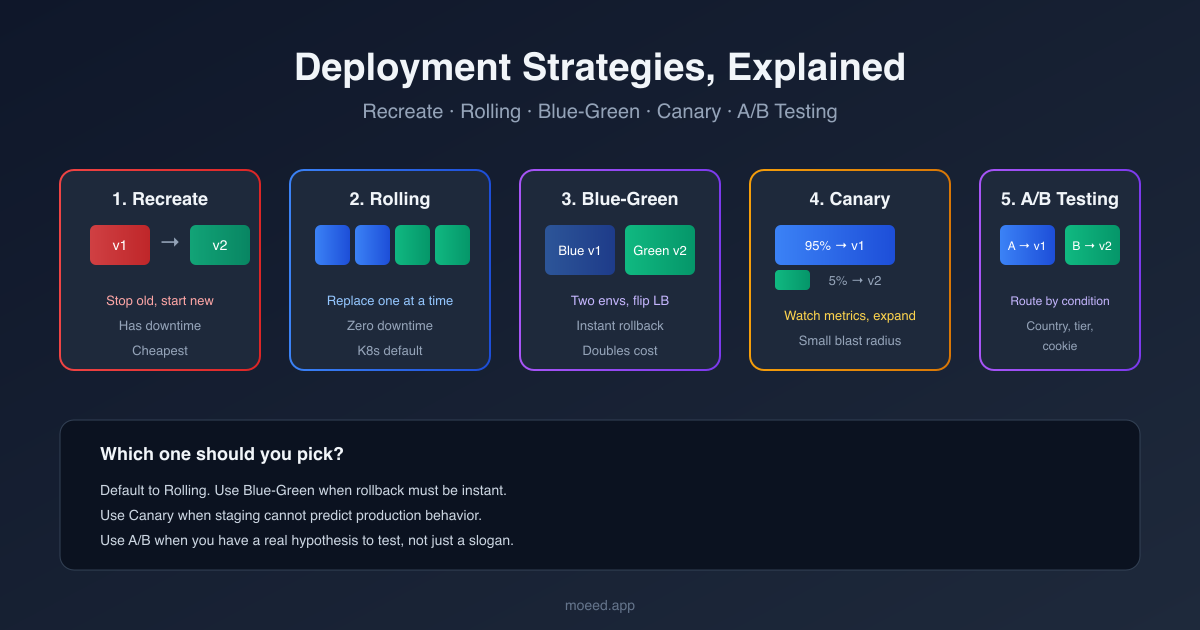
What a deployment strategy actually is
A deployment strategy is the recipe your release pipeline follows when it replaces an old version of your application with a new one. It answers three questions at once.
- Do users see downtime while the swap happens?
- If the new version is broken, how fast can you go back?
- Do you test the new version on real users, or only in staging?
Different strategies answer those three questions differently. That is the whole framework. Once you can see how each strategy answers them, the differences stop feeling abstract.
1. Recreate deployment
The simplest possible approach. Stop the old version, then start the new one.
How it works
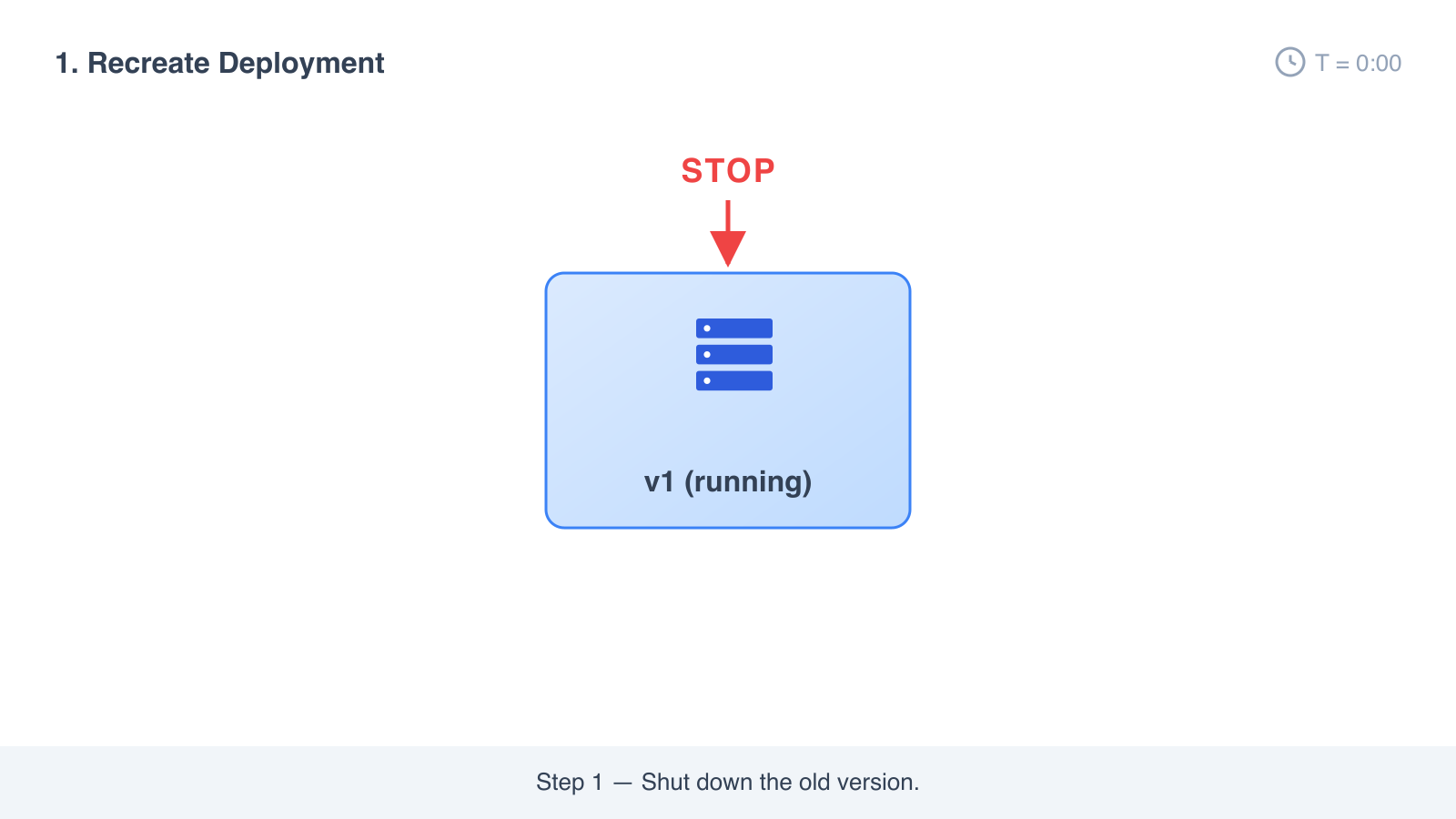
- Stop the old version.
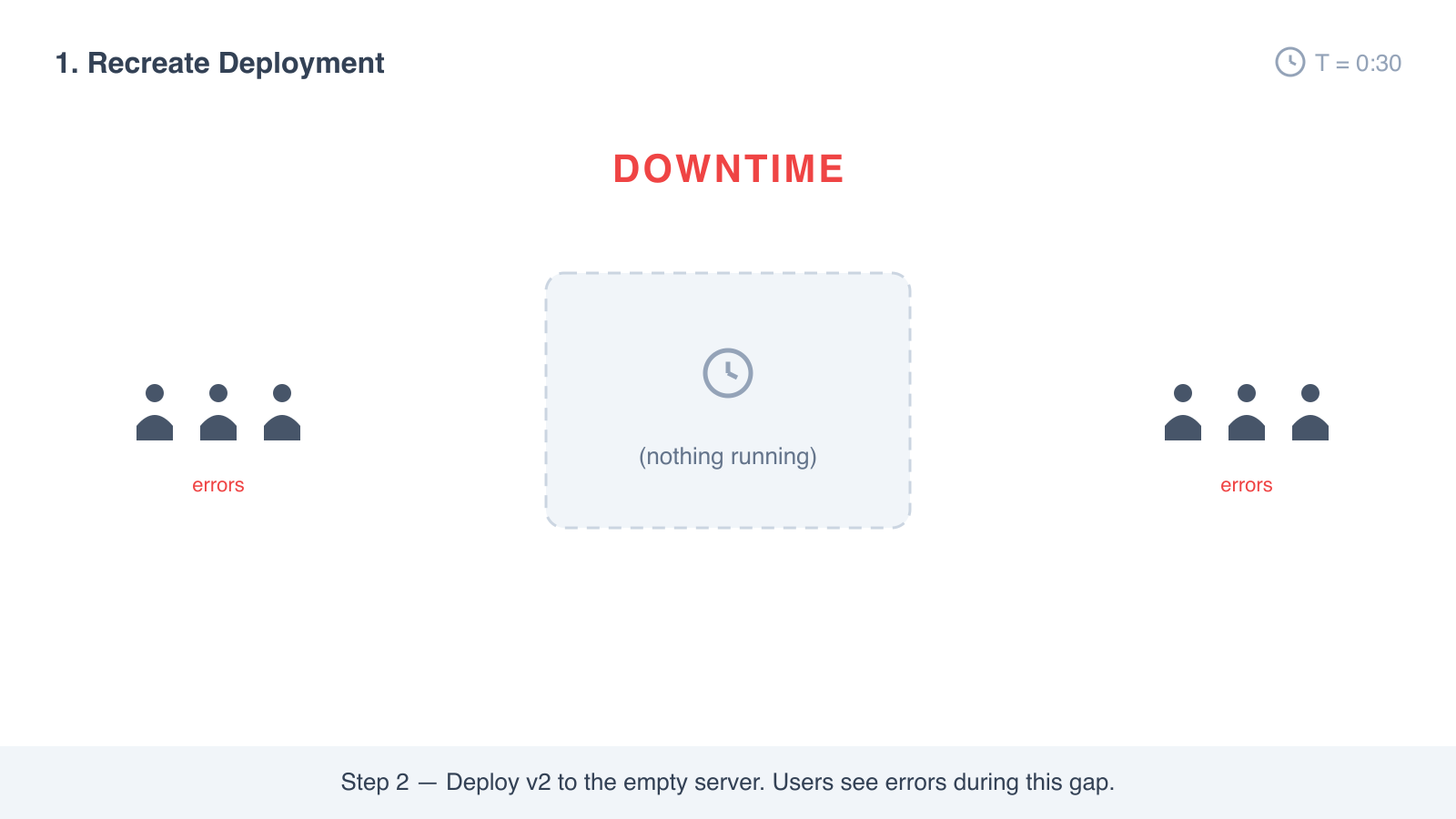
- Deploy the new version.
- Start the new version.
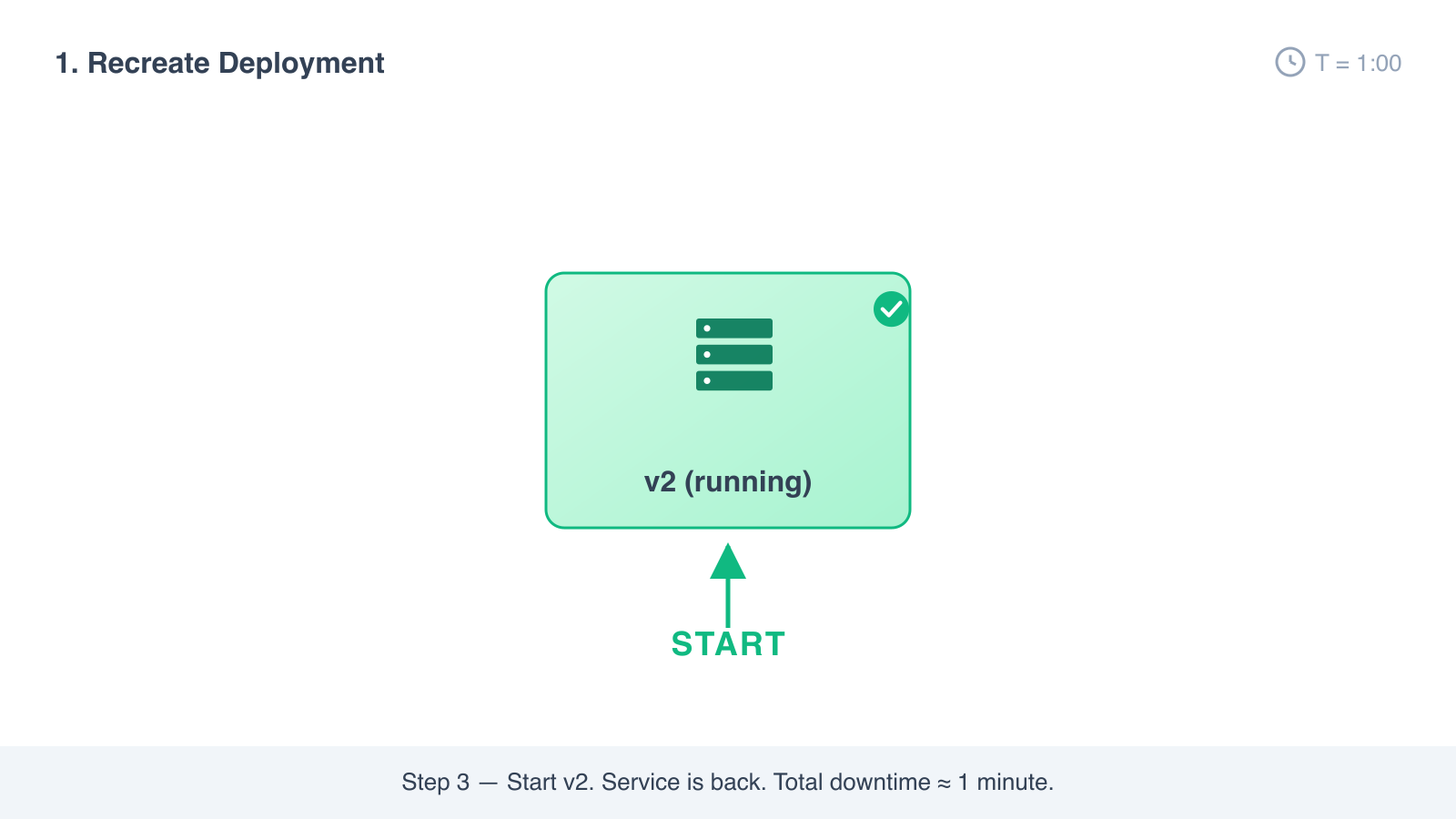
There is a gap between step 1 and step 3 where nothing is running. That gap is the downtime.
Advantages
- Easy to set up. Often a single command.
- No version mismatch. Users never see two versions at the same time.
- No extra infrastructure. You only ever run one copy of the app.
Disadvantages
- There is real downtime. Users see errors during the swap.
- Rollback means going through the same shut-down-then-start cycle again.
- Any request still being processed when you stop the app is lost.
When to use it
- Development or staging environments where downtime is fine.
- Internal tools that are not used 24/7.
- Database migrations where you actually need every old instance gone before the new one starts.
For a public-facing production app, recreate is almost never the right answer. The other strategies exist to avoid exactly the gap this one accepts.
2. Rolling deployment
Replace your instances one at a time, or in small batches, instead of all at once.
How it works
- You have N copies of v1 running behind a load balancer.
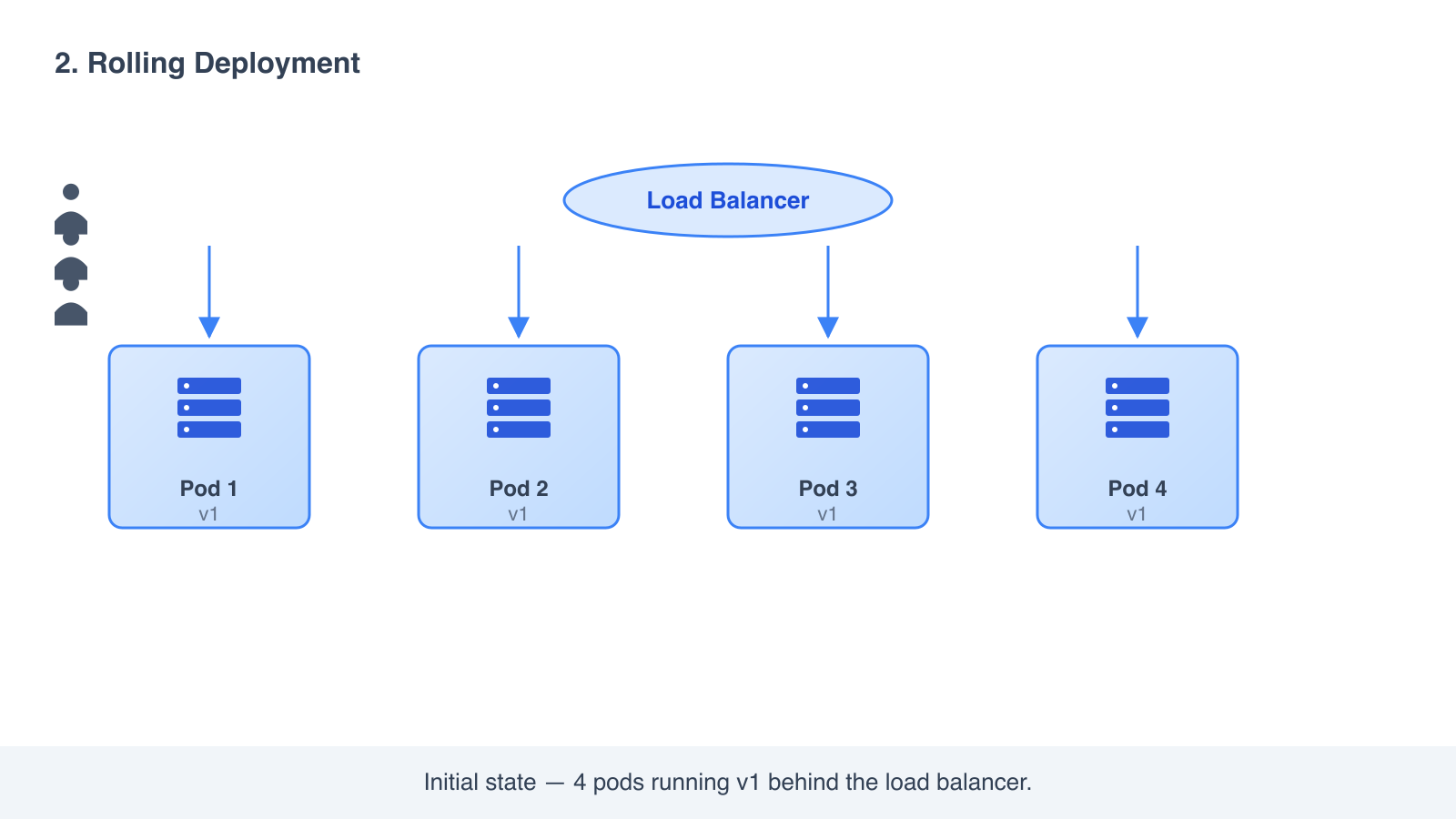
- Take one copy out of rotation. Replace it with v2.
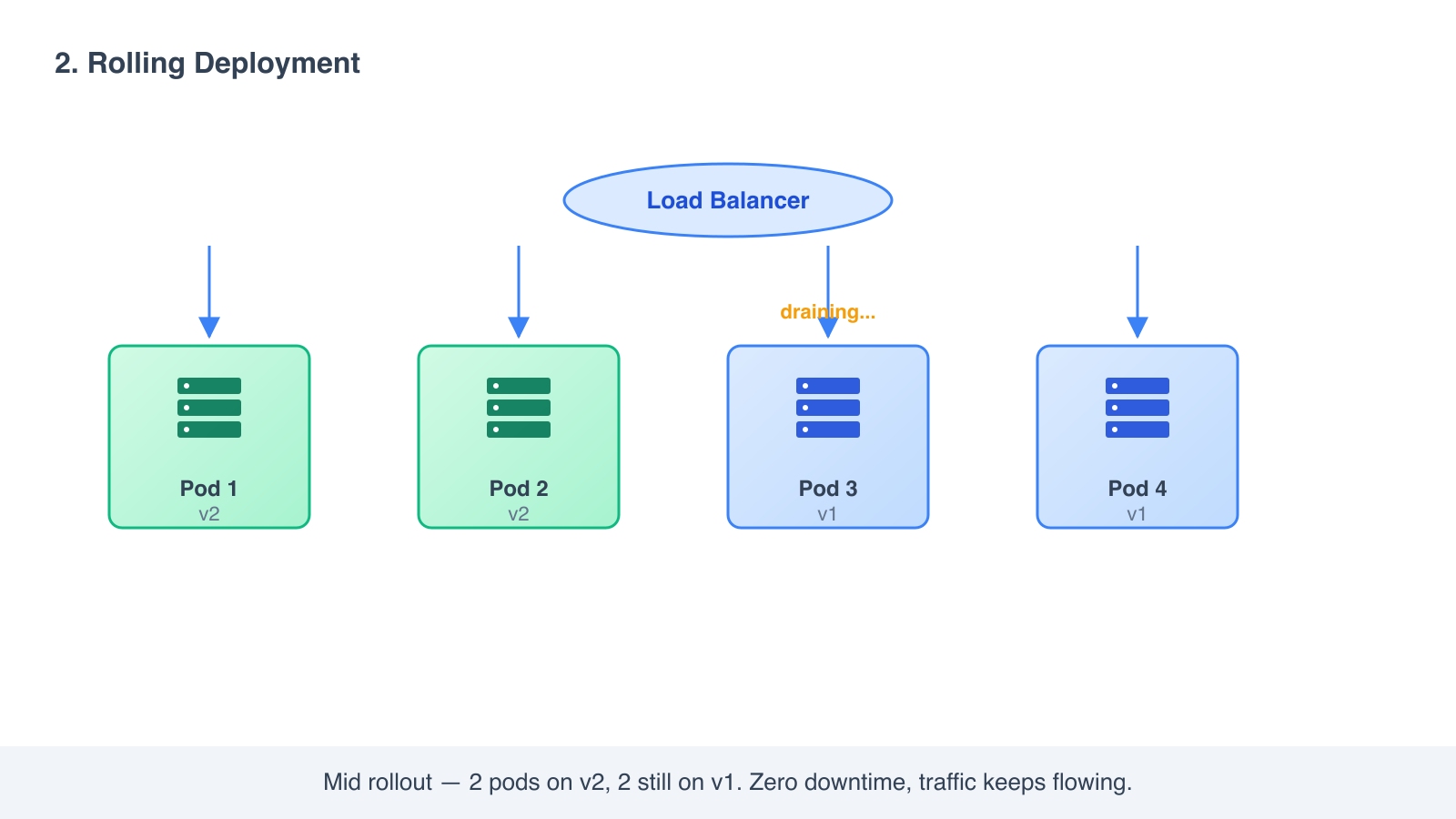
- Wait for it to pass a health check. Put it back in rotation.
- Repeat until all copies are running v2.
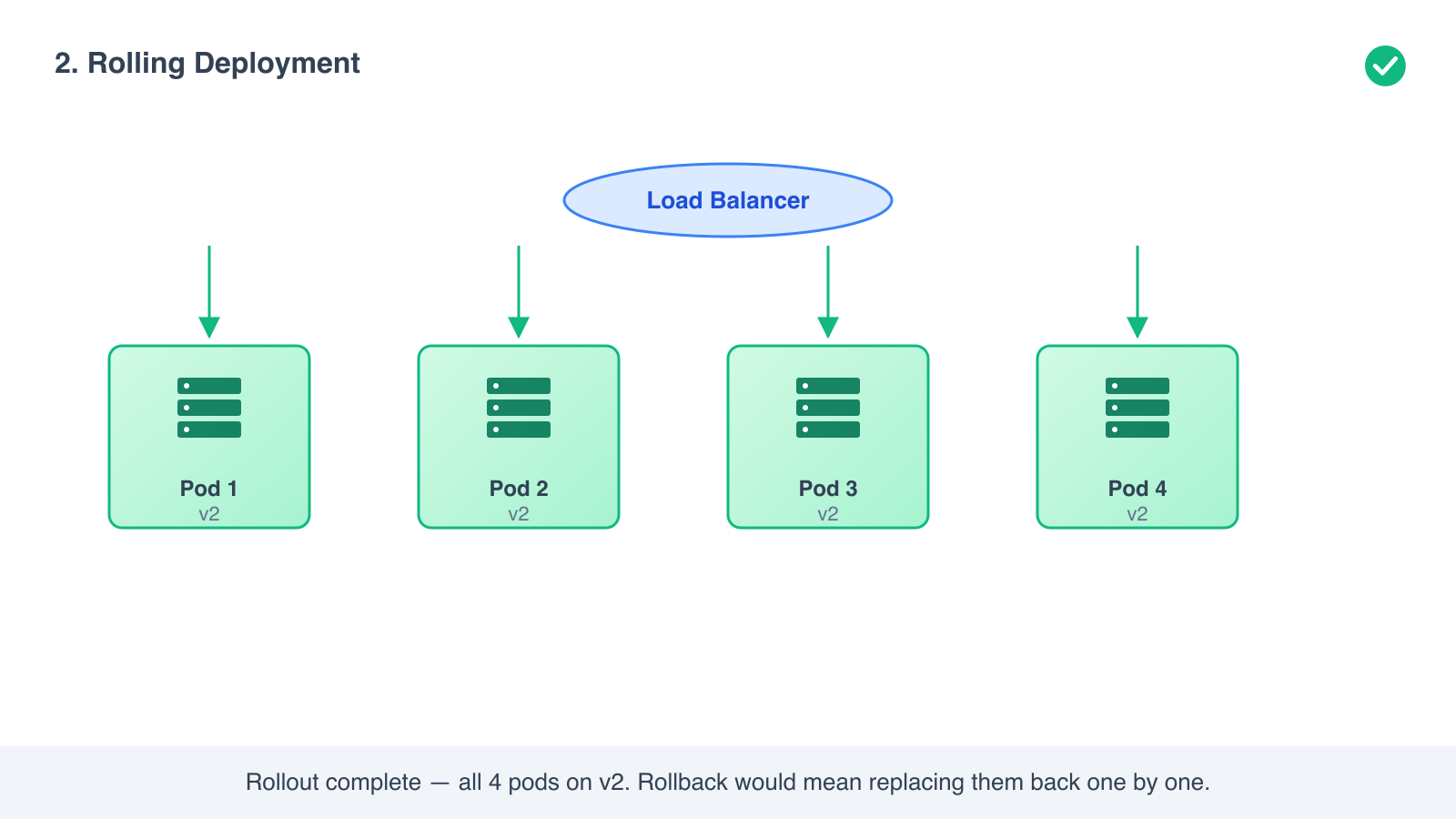
During the rollout, some users are served by v1 and some by v2. The load balancer never has zero instances available, so users see no downtime.
This is the default for a Kubernetes Deployment. That is why most teams encounter it first, even if they do not know its name.
Advantages
- Zero downtime. Traffic is always being served.
- No extra hardware needed. You replace one instance at a time inside your existing pool.
- Simple to automate. Kubernetes, ECS, and most platforms do it with one config flag.
Disadvantages
- Rollback is slow. If v2 is broken, you have to roll back the same way you rolled forward, one instance at a time.
- Both versions run at the same time. If v2 changes the database schema in a way v1 cannot read, you have a problem.
- An instance can pass its health check and still be broken in a way the check does not catch.
When to use it
- Stateless services where v1 and v2 can safely coexist.
- The default for most Kubernetes workloads.
- Internal services where a slow rollback is acceptable.
If your changes are backward compatible and you trust your tests, rolling is the default, reliable strategy for almost everything.
3. Blue-green deployment
Run two complete copies of your environment. One is live, the other is staged with the new version. When the new one is ready, switch all traffic over.
How it works
- Blue is your current production environment, running v1. All user traffic goes to blue.
- You build a second environment, green, that is identical in shape. Deploy v2 to green.
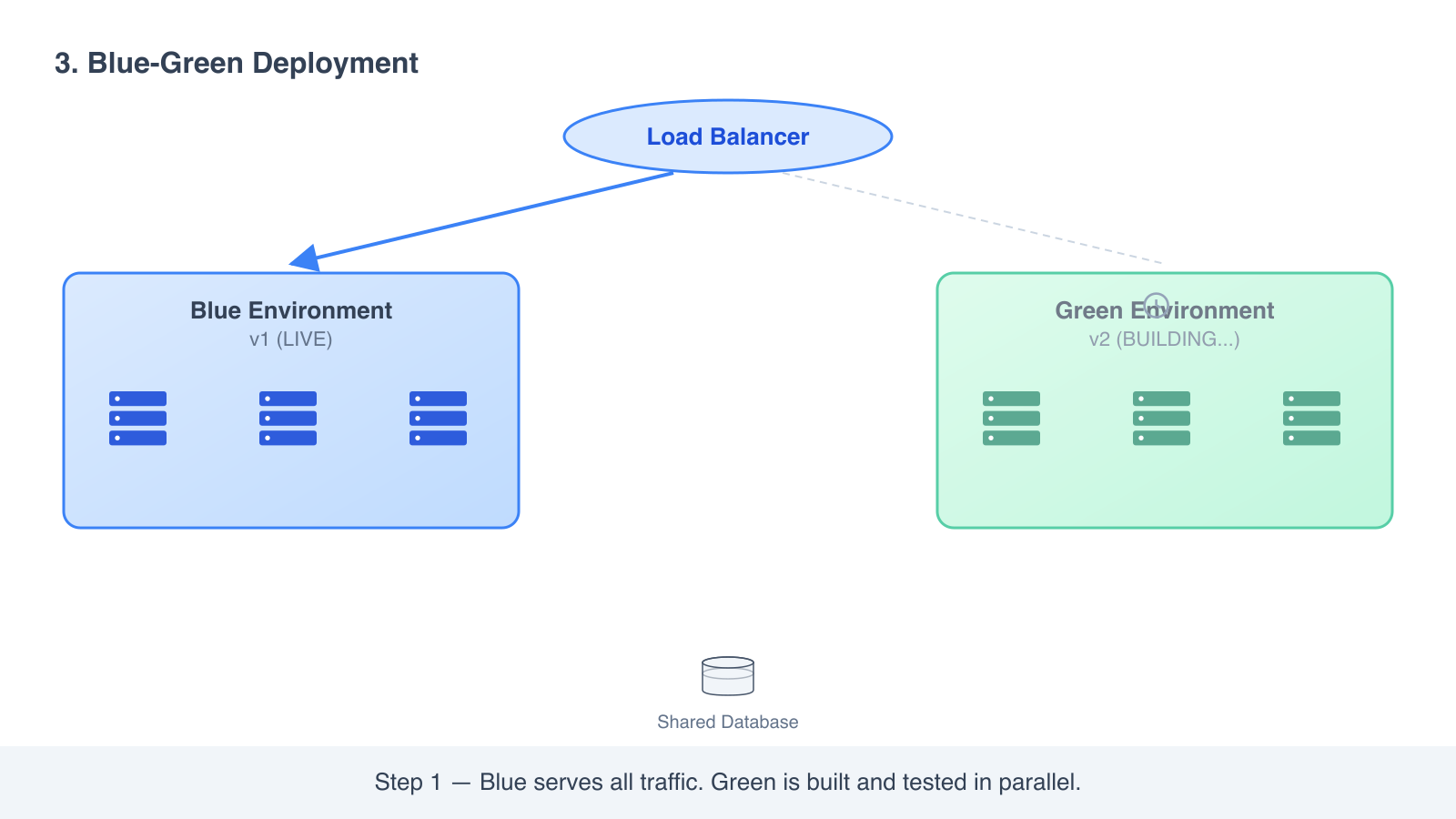
- Test green end to end. It can hit your real database (carefully) and real downstream services because it is configured exactly like blue.
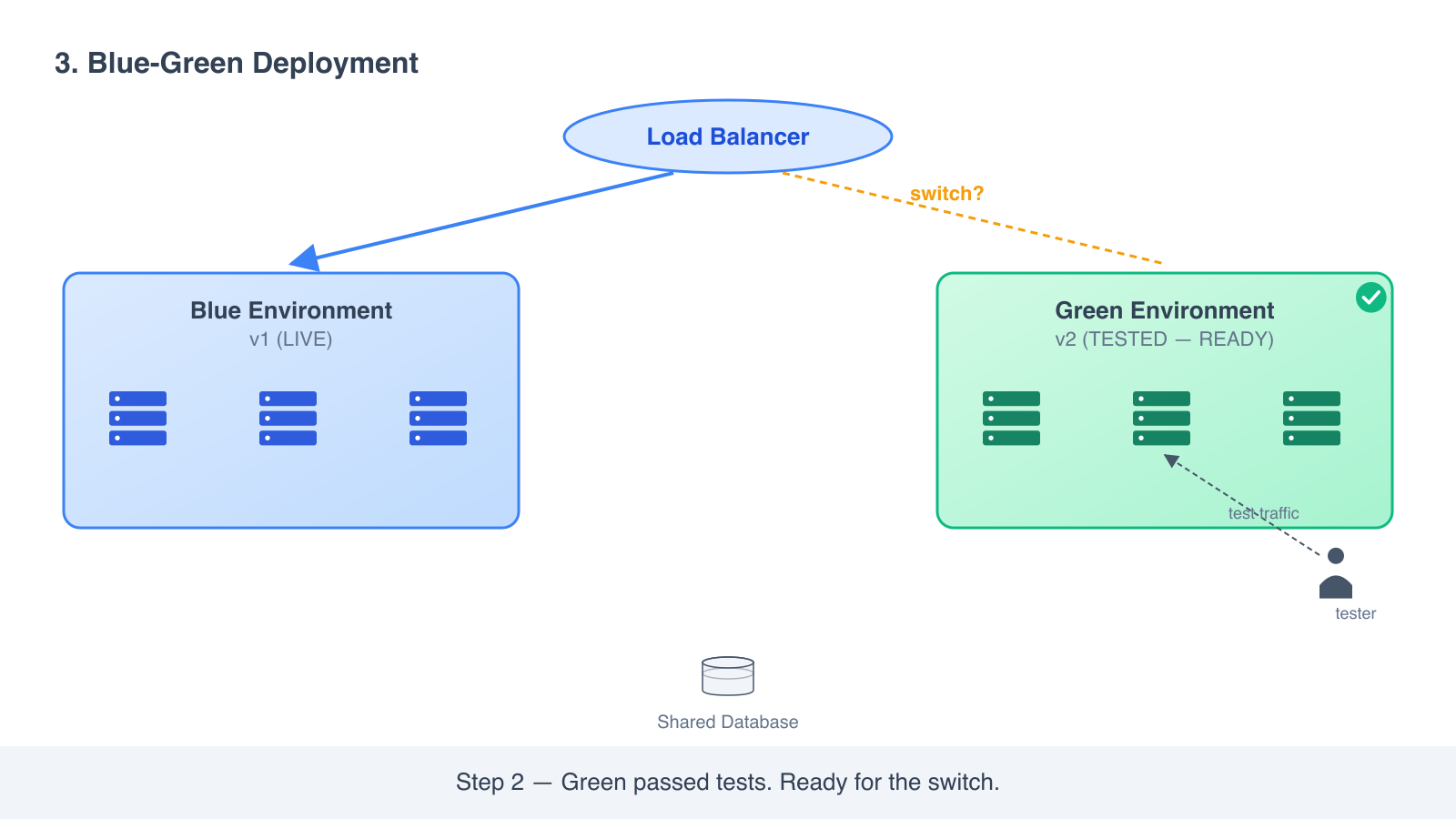
- When green is healthy, you flip the load balancer or DNS to send traffic to green instead of blue.
- Blue stays running. If anything goes wrong, you flip back to blue and you are recovered in seconds.
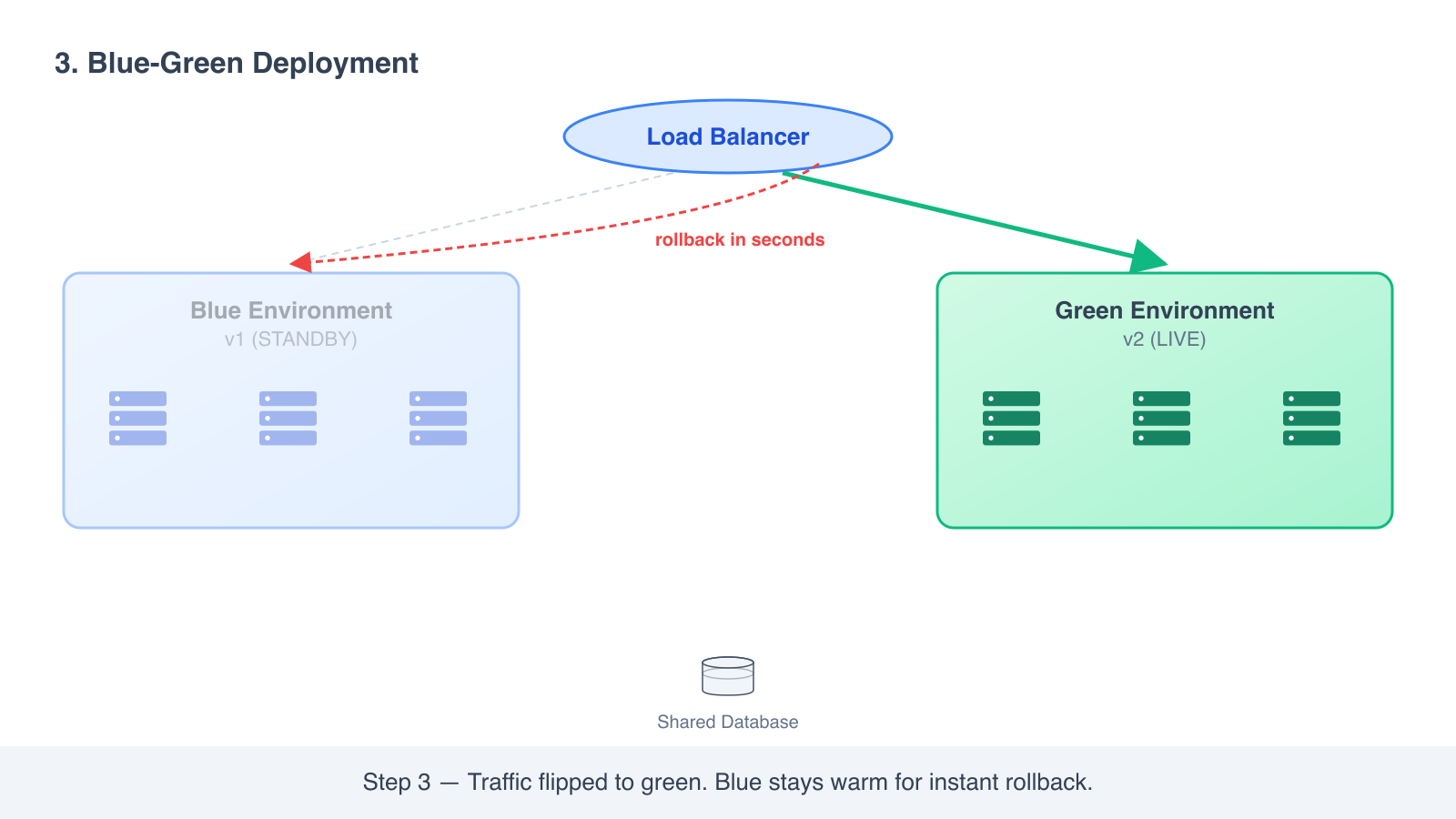
The “blue” and “green” names are just labels. The point is two environments that can swap roles.
Advantages
- Near-zero downtime. The switch is a single load balancer change.
- Instant rollback. The old environment is still there, fully warmed up.
- You can run real production-like tests on the new version before any user sees it.
Disadvantages
- You pay for two environments during the cutover. That is real money.
- Database changes are the hard part. If both blue and green share the same database, schema changes have to be backward compatible. If they have separate databases, you now have to plan how data moves between them.
- Some long-lived connections (websockets, server-sent events) do not switch cleanly. Users on those connections need to be drained gracefully.
When to use it
- High-stakes releases where downtime or a slow rollback is unacceptable.
- Financial services, payments, anything regulated.
- Releases that change a lot at once and need a clean way out if something is wrong.
Blue-green is the strategy you choose when “we cannot afford to be down” is a real business requirement, not just a marketing phrase.
4. Canary deployment
Send a small percentage of users to the new version first. Watch the metrics. If the new version is healthy, expand. If not, roll back before most users were ever affected.
The name comes from the old practice of taking a canary into a coal mine. If the canary stopped singing, you knew the air was bad before it killed you.
How it works
- Deploy v2 alongside v1. Both run at the same time.
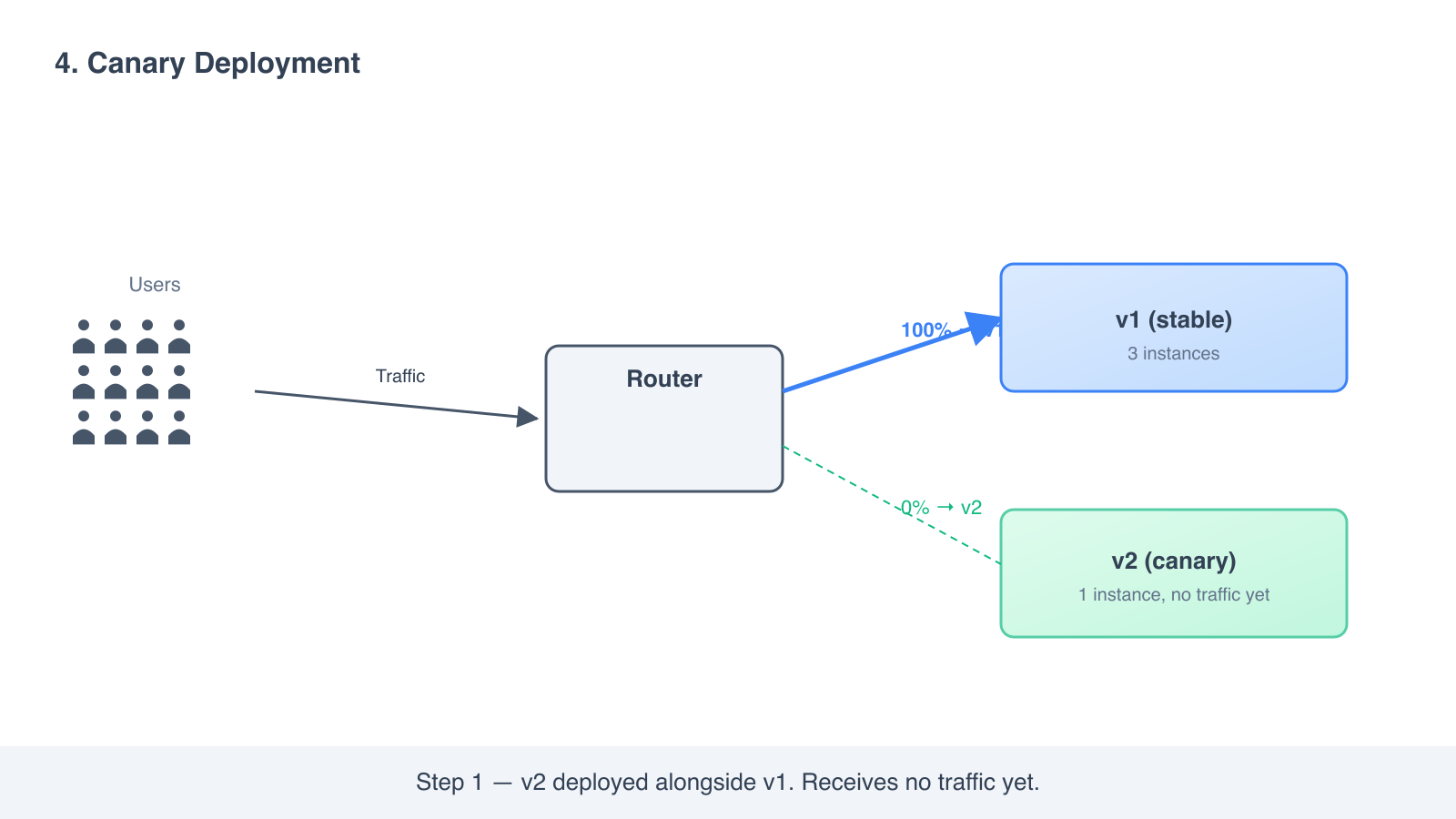
- Configure your load balancer to send 5 percent of traffic to v2 and 95 percent to v1.
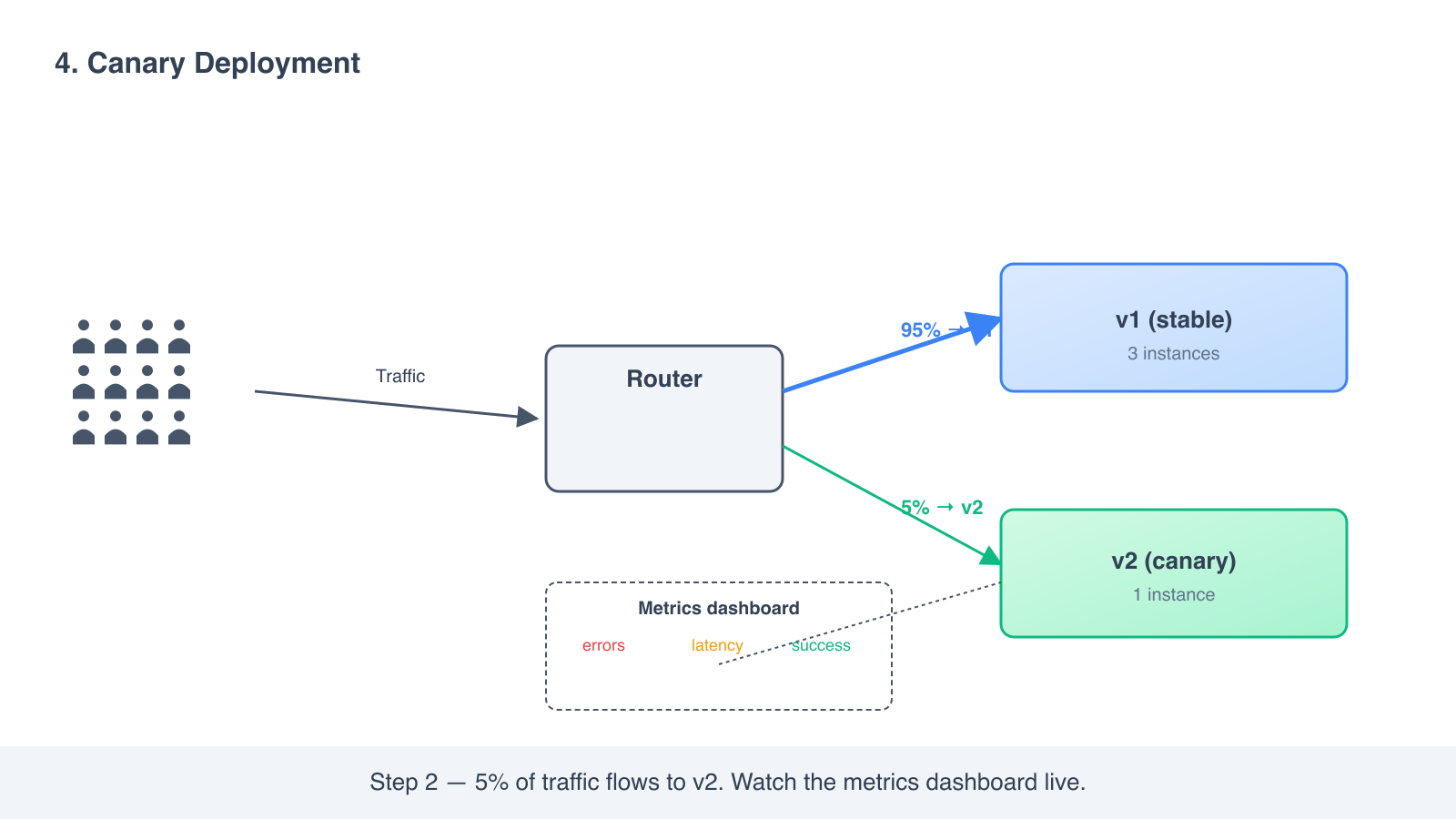
- Watch error rates, latency, business metrics. Compare v2 to v1.
- If v2 looks healthy, raise the percentage. 5 percent, then 25, then 50, then 100.
- Once v2 is at 100 percent, retire v1.
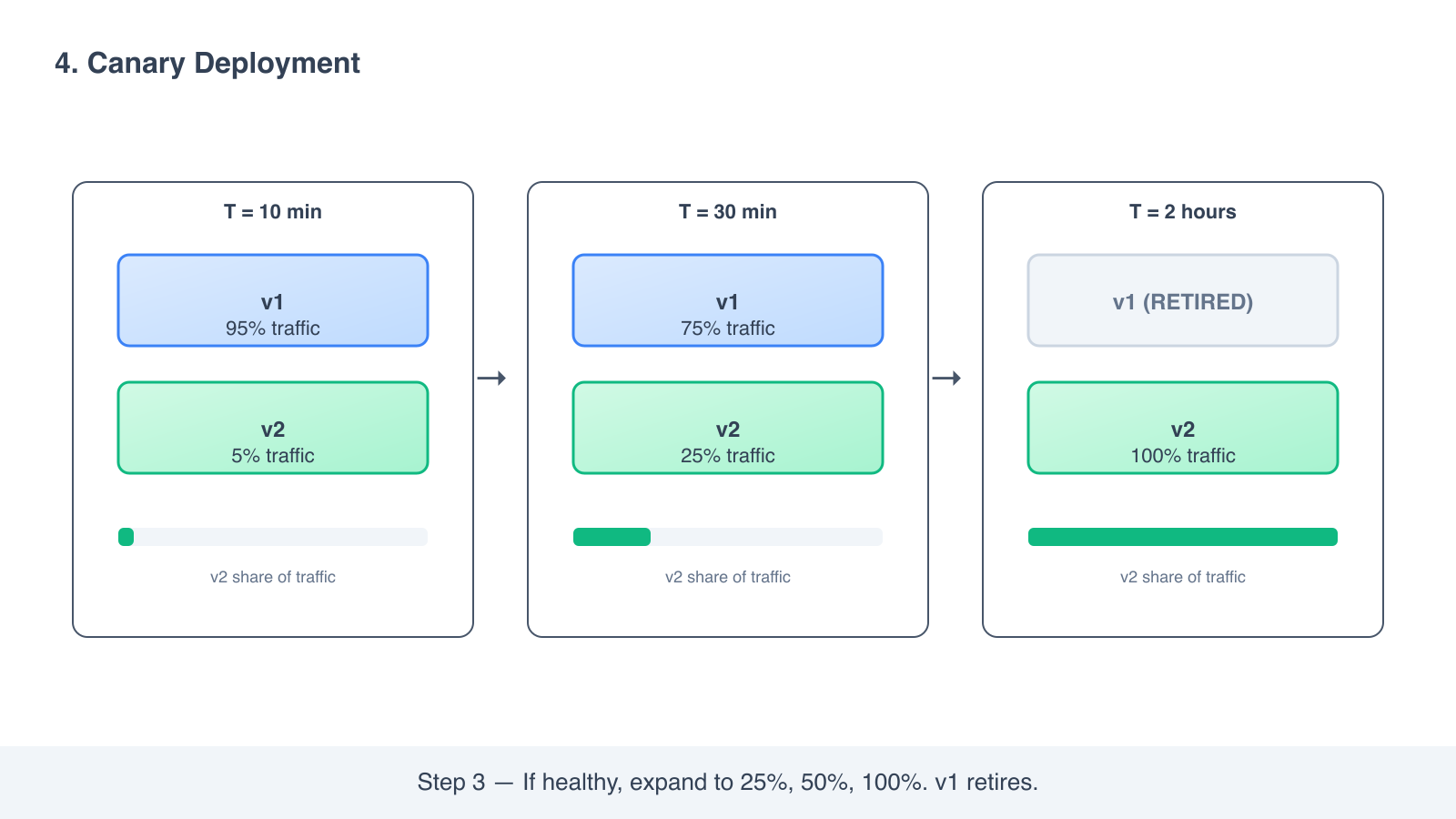
If anything looks wrong at any step, you flip the traffic back to v1 and stop.
Advantages
- Limited impact. A bad release affects only a small fraction of users before you catch it.
- Real-user validation. Synthetic tests miss things real production traffic exposes.
- Confidence in changes that are hard to test in staging, like a new model, a new caching layer, or a performance optimization.
Disadvantages
- You need traffic splitting. A simple load balancer is not enough; you need weighted routing.
- You need real observability. Without good dashboards and alerts, the canary is just a slower bad release.
- It is slower than rolling or blue-green. A full canary can take hours or days because each step is a soak period.
When to use it
- High-traffic services where even a small percentage of failed requests is a lot of users.
- Performance-sensitive changes where you want to see the new version’s behavior on real load.
- New algorithms, model swaps, infrastructure changes you cannot reproduce in staging.
Most teams running canary today use it together with rolling. You roll v2 out as a canary first; once you reach 100 percent, you continue with a normal rolling deploy for the next release.
5. A/B testing deployment
Route traffic by user attribute rather than by random percentage. The infrastructure looks similar to canary, but the routing rule is the difference that matters.
How it works
- Deploy v2 alongside v1, like a canary.
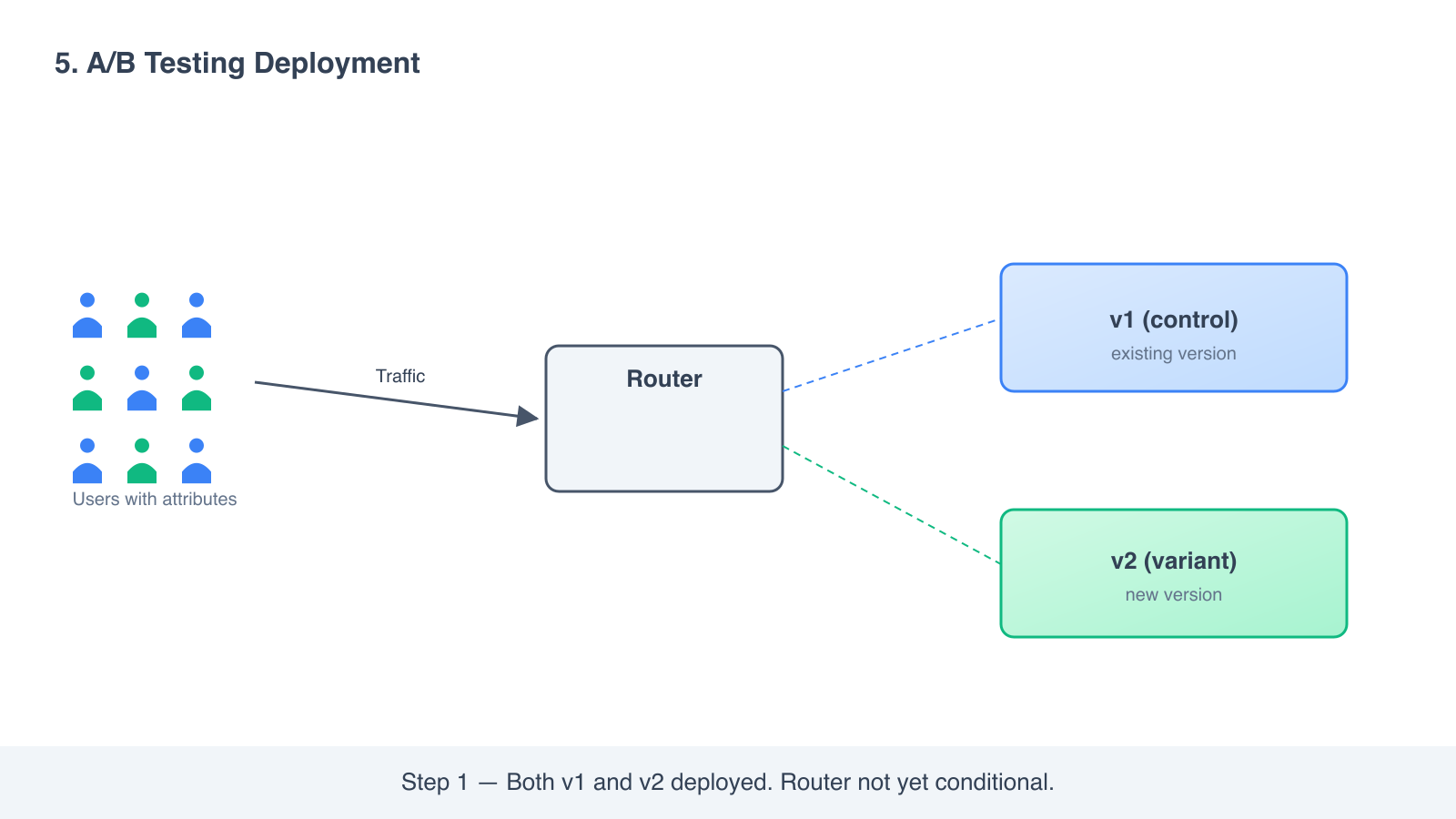
- Configure routing so that traffic is sent based on a condition, not a random split. Examples: “users in Germany go to v2,” “users on the paid tier go to v2,” “users with cookie
experiment_id=2go to v2.”
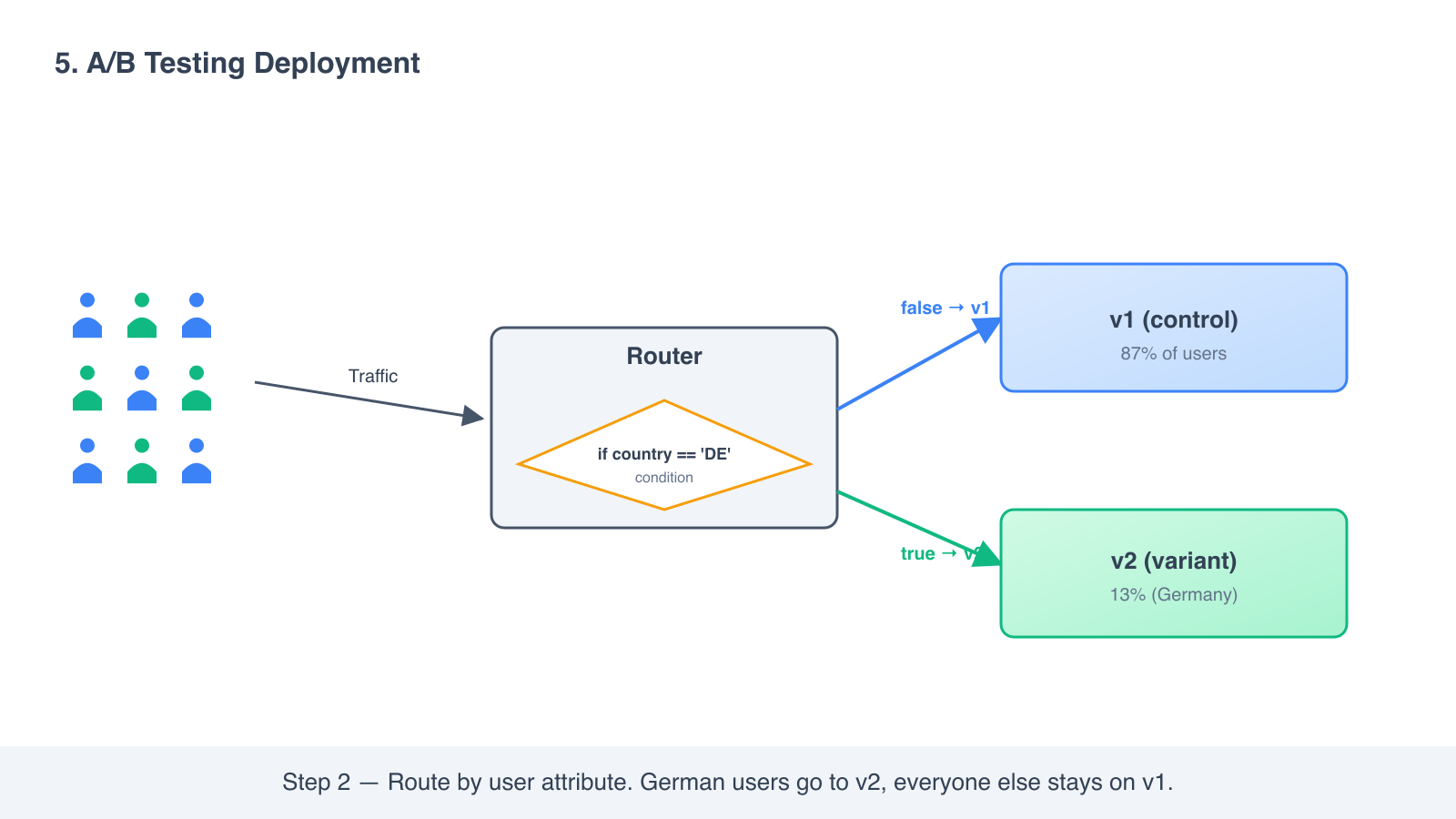
- Measure how the targeted segment behaves on v2 versus the rest on v1.
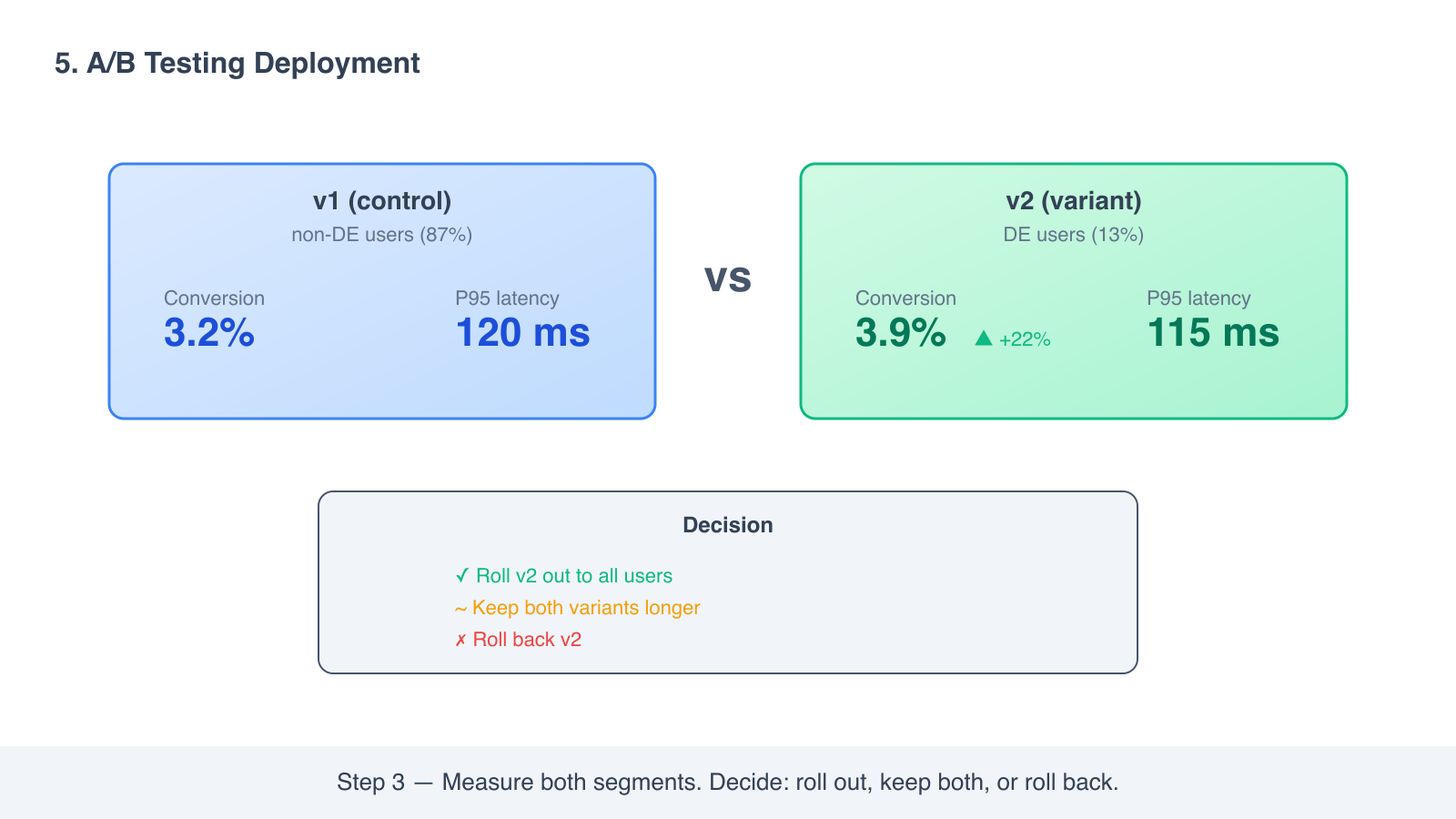
- Decide whether to expand v2 to everyone, keep both variants permanently, or roll back.
Advantages
- You can target a specific segment safely. New checkout flow for paid users only. New caching for one region only.
- It supports product experiments, not just infrastructure rollouts. Two variants of a feature can run in parallel and you can compare conversion.
- Rollback is instant for the targeted segment.
Disadvantages
- The routing layer is the most complex of any strategy. You need a way to inspect the request and decide which version to send it to.
- Two variants running long-term means two code paths to maintain. Most teams forget the cost of this.
- The line between “deployment strategy” and “feature flag system” blurs here. Tools like LaunchDarkly, GrowthBook, and Unleash live in this space.
When to use it
- Product experiments where the question is “does variant B convert better?”
- Geo-specific rollouts, like a new payment method that only works in one country.
- Pricing or plan-specific features.
A/B testing is the most powerful strategy and also the one most teams overuse. If you are not actually measuring a hypothesis, you are just splitting your codebase.
Quick comparison
The five strategies, side by side, on the dimensions that usually matter.
| Strategy | Zero downtime | Production traffic testing | Condition-based routing | Rollback time | Infrastructure overhead |
|---|---|---|---|---|---|
| Recreate | No | No | No | Fast but disruptive | None |
| Rolling | Yes | No | No | Slow | Small surge buffer |
| Blue-green | Yes | No | No | Instant | Two parallel environments |
| Canary | Yes | Yes | No | Fast | Small surge for v2 |
| A/B testing | Yes | Yes | Yes | Fast | Small surge plus a routing layer |
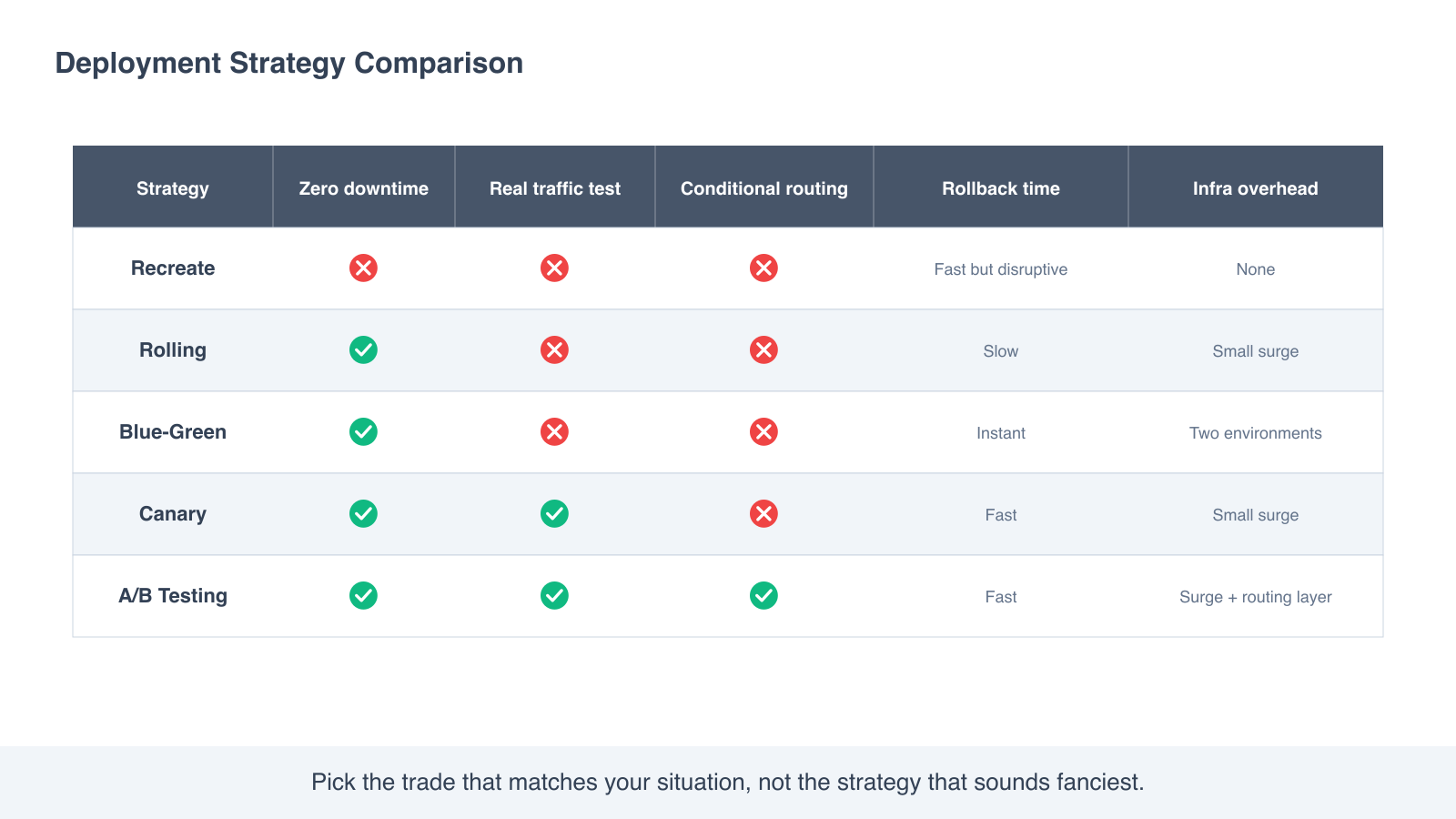
The last column is often the deciding factor in practice. Blue-green is the safest strategy on paper, but if you cannot afford to run two full environments at once, the cost rules it out before the engineering does.
How to actually choose
A short decision tree based on the conversations I have watched real teams have.
- Is this a development or internal tool that can take a few minutes of downtime? Recreate is fine. Stop overthinking it.
- Is this a normal stateless service with backward-compatible changes? Rolling. This is the default for most Kubernetes workloads, and it is the default for a reason.
- Is this a high-stakes release where a slow rollback would hurt the business? Blue-green. Pay for the second environment, sleep through the cutover.
- Are you changing something where staging cannot predict production behavior, like a performance change, a new model, or a caching layer? Canary. Real traffic is the only honest test.
- Are you running an actual product experiment with a hypothesis and a metric, or doing a region-specific or tier-specific rollout? A/B testing. Otherwise it is just an expensive way to keep two code paths alive.
The most common real-world setup is a combination. A team uses rolling as its default, blue-green for major releases, and canary on top of either for changes they are nervous about.
Where each strategy lives in your stack
So you know which layer of your infrastructure does the work.
- Recreate is a property of your deploy script. Stop, deploy, start.
- Rolling is a property of your orchestrator. Kubernetes Deployments, ECS services, Nomad jobs all support it natively.
- Blue-green is a property of your traffic layer. A load balancer or DNS swap, plus two parallel environments.
- Canary needs a load balancer that supports weighted routing. AWS ALB target groups, Istio, Linkerd, NGINX with split modules, or a service mesh.
- A/B testing needs the same traffic layer as canary plus a way to evaluate routing rules per request. This is where dedicated feature flag systems show up.
If you are deploying on AWS, the what is AWS ECS guide covers how rolling deployments are wired up inside an ECS service, and the ECS Express Mode guide covers the newer one-command path that defaults to rolling without you configuring it. If you have hit an CannotPullContainerError mid-rollout, the ECS pull error troubleshooting guide walks through the four root causes.
Frequently asked questions
Is a canary deployment the same as A/B testing?
No, but they look similar. Canary splits traffic randomly to validate that a new version is safe. A/B testing splits traffic by a condition to compare how two variants behave for a specific user group. The infrastructure overlaps; the goal is what differs.
Does Kubernetes default to rolling deployments?
Yes. A Deployment resource in Kubernetes uses rolling by default, with two configurable knobs: maxSurge and maxUnavailable. You can change the strategy to Recreate if you need it, but you would have to opt in.
Can I do canary without service mesh or fancy tooling?
Yes. AWS ALB with weighted target groups can do canary. NGINX with split clients can do it. Even a simple feature flag plus a request middleware can do it. The fancy tools (Istio, Linkerd, Flagger) make it easier to automate the soak-and-expand loop, not possible.
Which strategy is cheapest?
Recreate is the cheapest at the infrastructure level since you only ever run one copy. Rolling is the cheapest among the strategies that have zero downtime. Blue-green is the most expensive because you pay for two environments during cutover.
Which strategy is safest?
Blue-green is the safest on paper for a single release because rollback is instant. Canary is the safest in practice across many releases because it catches problems before they reach most users.
Are feature flags the same as deployment strategies?
No, but they are related. A deployment strategy is about getting your code onto the servers safely. A feature flag is about turning a feature on or off for some users after the code is already deployed. The two compose well: deploy with rolling or canary, then turn the feature on with a flag.
Can I combine strategies?
Yes, this is the most common production setup. Roll out the new version to a canary subset first, then continue with rolling once you trust it. Or use blue-green for the cutover, then run canary on top of the green environment for the next change.
What about Kubernetes recreate, is it ever a good idea?
Sometimes. If your app is a stateful workload that cannot have two versions running at once, like a leader-election service or a database that does not support online migration, Recreate is the honest answer. Accept the downtime, schedule it, communicate it.
Where to go next
- What is AWS ECS and how it works, because rolling and blue-green on ECS are where most AWS teams meet these strategies in practice.
- What is AWS ECS Express Mode, the newer one-command path that defaults to rolling without you configuring it.
- Fix CannotPullContainerError on ECS, for when your rollout breaks before it starts.
- AWS Copilot CLI end-of-support guide, if you were using Copilot to manage your deployment configuration and need to plan the migration.
If you remember one thing, remember the trade. Every strategy is buying you something at the cost of something else. Recreate buys simplicity at the cost of downtime. Rolling buys uptime at the cost of slow rollback. Blue-green buys instant rollback at the cost of paying for two environments. Canary buys real-traffic validation at the cost of slower rollouts. A/B testing buys targeted experimentation at the cost of routing complexity. Pick the one whose trade matches your situation, not the one that sounds fanciest.