What Is AWS ECS and How It Works (Beginner Guide)
A plain-English guide to Amazon ECS: what it is, how it differs from EC2, what ECR does, when to use it, and the full container deployment flow.
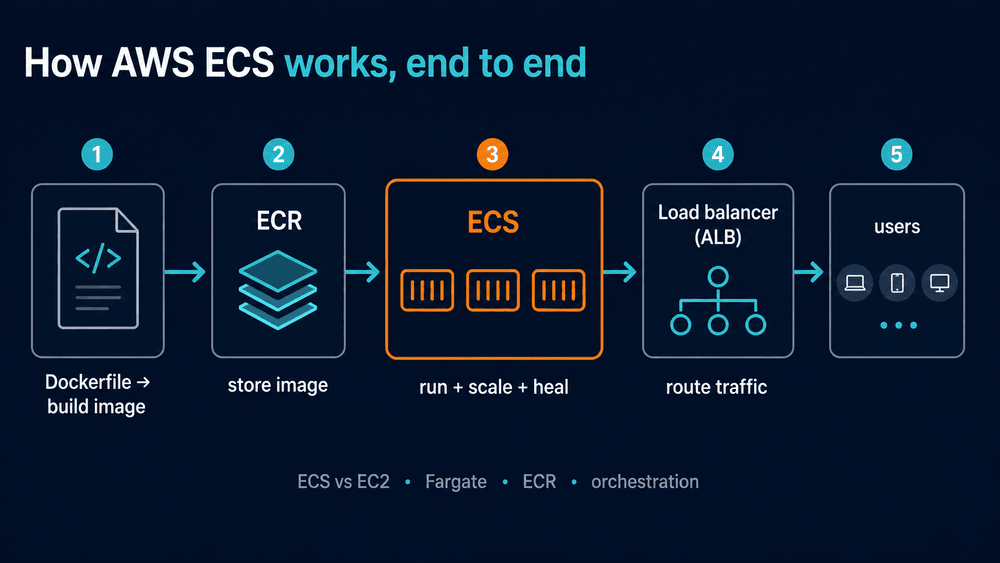
If you have a containerized application and you want AWS to run it for you without you babysitting servers, Amazon ECS is the service you are looking for. ECS takes your container, decides which machine it should run on, restarts it when it crashes, scales it up when traffic rises, and connects it to a load balancer so users can reach it.
That is the one-sentence version. The reason ECS confuses people who are new to AWS is not the service itself. It is the surrounding vocabulary: containers, orchestration, EC2, Fargate, ECR, task definitions, services. Every one of those words assumes you already know the others.
This guide assumes you know none of them. We will build the picture from the ground up, in the order the pieces actually connect, and by the end you will understand not just what ECS is but why each piece exists and when you should reach for it.
Amazon ECS is a managed container orchestration service. You hand it a container image, describe how you want it to run, and ECS places it on compute, keeps it healthy, scales it, and wires it to networking. It runs containers either on EC2 servers you own or on Fargate, where AWS owns the servers and you never see them.
First, what a container actually is
Skip this section if you already work with Docker. If you do not, this is the foundation everything else sits on.
A container is your application plus everything it needs to run, packaged into one sealed unit. Your code, the language runtime, the libraries, the system dependencies, all of it. The point is that the container runs the same way on your laptop, on a colleague’s laptop, and on a server in AWS. The old problem of “it works on my machine” mostly goes away because the machine is now part of the package.
You build a container from a Dockerfile, which is a short recipe. Here is a minimal one for a Node.js app:
FROM node:22-slim
WORKDIR /app
COPY package*.json ./
RUN npm ci --omit=dev
COPY . .
EXPOSE 3000
CMD ["node", "server.js"]
You run docker build and you get an image. You run that image and you get a running container. So far this has nothing to do with AWS. The question ECS answers is the next one: you have a container that works, now how do you run it in production, reliably, for real users?
What container orchestration means
This is the concept that has to land before ECS makes sense, so we will go slowly and use a concrete example.
Imagine you run a single container on one server. It works. Now reality arrives:
- The container crashes at 3am. Someone has to notice and restart it.
- Traffic triples on launch day. One container is not enough. You need five, then ten, spread across several servers.
- You ship a new version. You want the old containers replaced by new ones without the site going down for even a second.
- One of your servers dies. Every container on it needs to move to a healthy server, automatically.
- New requests need to be shared evenly across all running containers.
Doing all of that by hand is a full-time job, and a job humans are bad at because it happens at night and under load. Orchestration is the automation of exactly this list. An orchestrator is a piece of software whose entire purpose is to keep the right number of healthy containers running in the right places and connected to the right network, without a human watching.
A useful mental model is a restaurant kitchen during a dinner rush. The line cooks are the containers, each doing one job. The head chef is the orchestrator. The chef does not cook. The chef decides how many cooks work each station, moves a cook to grill when grill orders spike, replaces a cook who walks out, and makes sure plates flow out evenly. Take the head chef away and the food still gets cooked, but the moment anything goes wrong, the whole kitchen stalls. Orchestration is the head chef for your containers.
Amazon ECS is one such orchestrator. Kubernetes is another. ECS is the one AWS built, and it is tightly wired into the rest of AWS, which is both its main strength and the reason it only runs on AWS.
What Amazon ECS is
Amazon Elastic Container Service is AWS’s managed container orchestration service. “Managed” means AWS runs the orchestrator itself, the brain that makes the placement and scaling decisions. You never install it, patch it, or keep it alive. You describe what you want and ECS makes it true.
ECS solves three problems for a team that has containers but does not want to run an orchestration platform:
- It removes the operational work of orchestration. There is a scheduler that places your containers based on the CPU and memory they need and the rules you set.
- It is wired into the rest of AWS by default. Pulling images from ECR, permissions through IAM, logs and metrics through CloudWatch, traffic through an Application Load Balancer. None of that is glue you write.
- It gives you a choice of how much of the underlying machine you want to manage, from “none at all” to “all of it.”
That third point is where most beginners get lost, because it collides with a service they have already heard of: EC2.
ECS vs EC2: the confusion everyone has first
This is the single most common point of confusion, so it gets its own section and a clear answer.
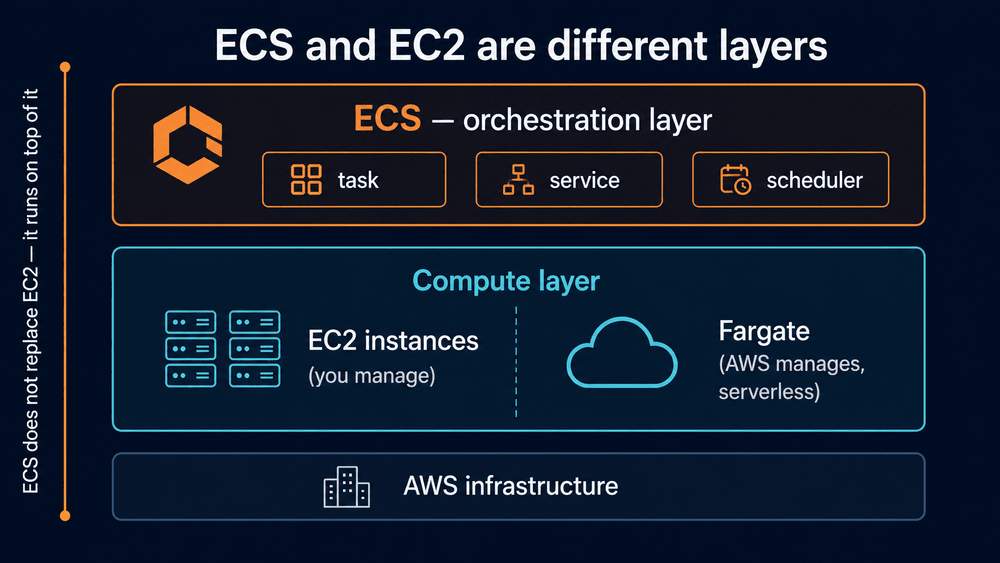
EC2 and ECS are not competitors. They are not two ways to do the same thing. They sit at different layers of the stack.
EC2 gives you a virtual machine. A server in the cloud with an operating system that you control. It is raw compute. EC2 does not know or care whether you run containers, a database, or a 2009-era PHP app on it. It just gives you a machine.
ECS is an orchestration layer that runs containers. It needs somewhere to actually place those containers, and one of its options is to place them on EC2 machines.
So the relationship is not “ECS or EC2.” It is often “ECS running containers on top of EC2.” ECS is the head chef. EC2 is the kitchen the chef works in. You can also choose a kitchen you never see or maintain, which is Fargate: AWS’s serverless way to run containers, where there is no server for you to create, log into, or patch. We cover Fargate properly in its own section below, but keep that one-line meaning in mind, because it shows up in the diagram at the top of this article and you should not have to wait to know what it means.
Here is the comparison most beginners actually need:
| EC2 (on its own) | ECS | |
|---|---|---|
| What it gives you | A virtual machine with an OS you manage | A system that runs and manages containers |
| Layer | Infrastructure (the machine) | Orchestration (what runs on the machine) |
| You are responsible for | OS patching, scaling, what you install | Container config and scaling rules |
| Good when | You need full control of the server, non-containerized or legacy apps | You have containers and want them run for you |
| Pricing | You pay for the running instance | ECS itself is free; you pay for the compute under it |
A note on that last cell, because it surprises people: ECS as a service costs nothing extra. You pay for the compute your containers consume. If that compute is EC2, you pay the EC2 bill. If it is Fargate, you pay for the CPU and memory your containers use. The orchestration brain is free; the kitchen is not.
The core pieces of ECS, with one example all the way through
ECS has four concepts. Definitions alone do not make them stick, so we will use a single concrete example and follow it through every piece.
The example: you have a Node.js web API in a container. It listens on port 3000. You want it serving real users, staying up if it crashes, and surviving a traffic spike on launch day.
Task definition — the blueprint
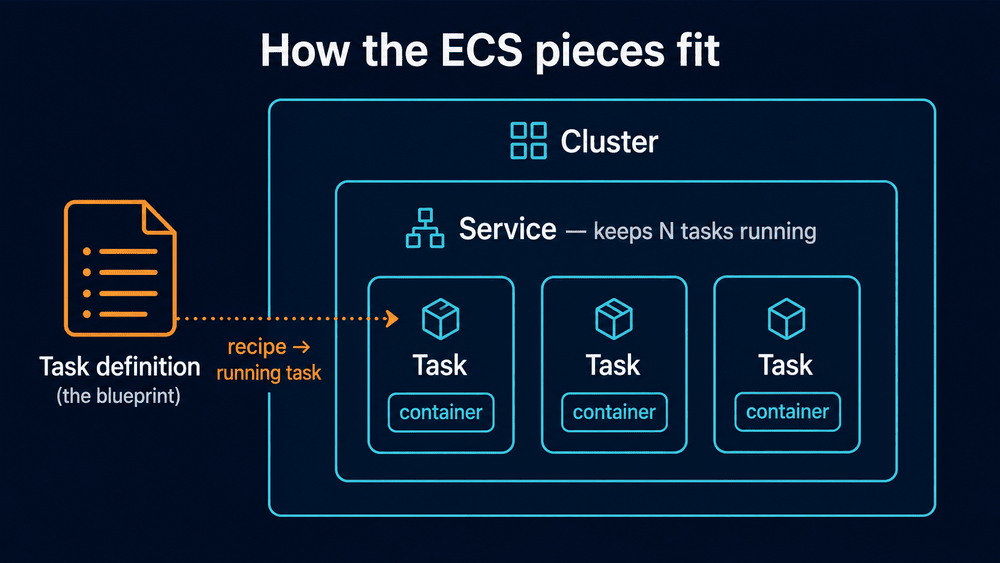
A task definition is a JSON document that describes how to run your container. Nothing runs from it by itself. It is the recipe, not the meal.
For our API, the task definition would say something like: use the image …/my-api:latest from ECR, give the container 0.5 vCPU and 1 GB of memory, open container port 3000, send logs to CloudWatch, and use these two IAM roles. That is it. A description on paper. You can register it, look at it, and version it, and still nothing is running yet.
Task — one running copy
A task is what you get when ECS takes that blueprint and actually launches it. One task here means one running copy of your API container, listening on port 3000, alive and serving requests.
If the task definition is the recipe, the task is the actual plated dish. And like a dish, a single task is fragile: if that container crashes, that task is gone. Nothing brings it back on its own. Running one bare task is fine for a quick test and wrong for production, which is exactly the gap the next piece fills.
Service — the thing that keeps tasks alive
A service is the supervisor. You tell it the desired state and it makes reality match, continuously.
For our API you create a service that says: always keep 3 tasks of this API running, behind a load balancer. Now four things become true without you doing anything:
- ECS starts 3 tasks of the API and watches them.
- If one task crashes, the service immediately launches a replacement so you are back to 3. That is the “stays up if it crashes” requirement, solved.
- On launch day you change the desired count from 3 to 10 (or let autoscaling do it), and the service adds 7 more tasks. That is the traffic-spike requirement, solved.
- When you ship a new version of the API, the service rolls tasks over a few at a time, old replaced by new, with no moment where zero tasks are serving. That is zero-downtime deploys, for free.
The rule of thumb: anything long-running, like a web API or a worker, runs as a service. One-off jobs that start, do a thing, and exit, like a nightly data import, run as a plain task.
Cluster — the boundary it all lives in
A cluster is the logical box that holds the above. Our service and its tasks would live inside a cluster you might call prod. A cluster is mostly an organizational and security boundary. You create it once and rarely think about it again.
One more, for the EC2 launch type
If you run on the EC2 launch type, there is a fifth piece: the container agent, a small program on each EC2 machine that lets ECS talk to it. With Fargate you never see the agent because you never see the machine. If “Fargate” still feels vague, the next section defines it properly.
Where ECS actually runs your containers
ECS makes the decisions. Something still has to be the physical computer the container runs on. ECS gives you three options, and choosing between them is the main architectural decision you will make.
EC2 launch type. ECS places containers on a pool of EC2 instances that you own and manage. You are responsible for those instances: their size, their number, their OS patches. In return you get the most control and, at steady high scale, often the lowest cost. This is the right call when you have predictable heavy load or need specific instance types like GPUs.
Fargate. This is AWS’s serverless compute for containers, and it is worth being precise about what that word means here. “Serverless” does not mean there is no server. It means you never deal with one. There is no EC2 instance for you to choose, launch, log into, patch, or scale. You hand ECS a task and say “this task needs 0.5 vCPU and 1 GB of memory,” and AWS quietly finds a machine, runs your container on it, and takes it away when the task stops. You never learn which machine it was.
Back to our Node.js API example: on Fargate, you would never create a server for it. The service just keeps 3 tasks running and AWS provides whatever compute those 3 tasks need, invisibly. You pay per task for the CPU and memory it requests, billed from the moment the image starts pulling until the task stops. That is the whole model. This is the right default for most teams and almost always the right place to start. The trade-off is some cost efficiency at very large, steady scale in exchange for never running a server at all, which for most workloads is a trade worth making.
ECS Managed Instances. A newer middle option AWS introduced in 2025. It gives you EC2-style flexibility with Fargate-style operations, so you get more control over the instances than Fargate allows while AWS still handles much of the operational load. Reach for this only once you have a specific reason Fargate does not fit; if you are new, ignore it until you do.
The honest default: start on Fargate. You will move workloads to the EC2 launch type later if and when the cost math or a hardware need forces the question. Most workloads never need to.
What ECR is and why ECS needs it
ECS knows how to run a container image. It does not hold the image. The image has to live somewhere ECS can pull it from. That somewhere is a container registry.
Amazon ECR, Elastic Container Registry, is AWS’s own registry. It is a private, secured place to store your container images inside your AWS account. Docker Hub is a public registry you may already know; ECR is the AWS-native, private equivalent, and it integrates with IAM so only the right roles can pull your images.
The reason ECR matters for an ECS guide is that it is not optional in practice. The normal flow is: you build an image locally or in CI, you push it to ECR, and your ECS task definition points at that ECR image. When ECS starts a task, it pulls the image from ECR onto the compute and runs it. No registry, no image to run.
This is why ECR sits between Docker and ECS in the diagram at the top of this article. It is a small service with a small job, but the flow does not work without it. A standalone deep dive into ECR lifecycle policies, scanning, and cross-account access is worth its own article; for now, all you need is the mental model: build, push to ECR, ECS pulls from ECR.
The entire flow, end to end
Here is the whole path from code to a container serving real traffic. This is the part to keep open the first time you do it for real.
1. Write a Dockerfile and build the image.
docker build -t my-api .2. Create an ECR repository and push the image to it.
aws ecr create-repository --repository-name my-api

# Log Docker in to your ECR registry
aws ecr get-login-password --region us-east-1 \
  | docker login --username AWS --password-stdin \
    <account-id>.dkr.ecr.us-east-1.amazonaws.com

# Tag and push
docker tag my-api:latest \
  <account-id>.dkr.ecr.us-east-1.amazonaws.com/my-api:latest
docker push \
  <account-id>.dkr.ecr.us-east-1.amazonaws.com/my-api:latest
3. Write a task definition that points at the image you just pushed, and register it. It declares the image URI, CPU and memory, the container port, log configuration, and two IAM roles, which are the part beginners get wrong, so they get their own note below.
4. Create a cluster. This is one command or a few clicks and is rarely the part that goes wrong.
aws ecs create-cluster --cluster-name my-cluster5. Create a service in that cluster from your task definition. Tell it how many tasks you want and attach it to an Application Load Balancer so traffic can reach the tasks. The service now keeps that many healthy tasks running and routes traffic across them.
6. Networking. Your tasks run inside a VPC, in subnets, behind security groups. The load balancer takes public traffic and forwards it to the tasks on their container port. For a first deployment, the defaults plus one security group rule that allows the load balancer to reach the task port is enough.
7. Users hit the load balancer, the load balancer spreads requests across your running tasks, and your application is live. When you ship a new version you push a new image, register a new task definition revision, and update the service, which rolls tasks over without downtime.
The two IAM roles, because this is where first deployments fail
A task definition references two different roles, and mixing them up is the most common reason a first ECS deployment does not start.
- The task execution role is used by ECS itself to set the task up: pulling the image from ECR and writing logs to CloudWatch. If this role is missing or lacks ECR permissions, your task fails before your code ever runs, usually with an image-pull error.
- The task role is used by your application code while it runs, for example to read from S3 or a database secret. If your app cannot reach an AWS service at runtime, this is the role to check.
If you remember nothing else about IAM and ECS, remember that “cannot pull image” is the execution role and “my code cannot call AWS” is the task role.
When you should use ECS, and when you should not
ECS is a good fit, not a universal one. Here is the honest decision guidance.
Use ECS when:
- You have containerized applications and you are committed to AWS.
- You want orchestration without running Kubernetes yourself.
- You are running web services, APIs, background workers, or batch jobs.
- You want the fastest path from a working container to production on AWS.
Consider alternatives when:
- You need Kubernetes specifically, for its ecosystem or multi-cloud portability. Then look at EKS, AWS’s managed Kubernetes. It is more powerful and more complex; pick it when you have a real reason, not by default.
- Your workload is tiny and event-driven, a function that runs for a few seconds in response to an event. AWS Lambda is often simpler and cheaper than a container that has to stay running.
- You want the absolute simplest path for a single web app or API and do not need fine control. AWS App Runner wraps a lot of the ECS flow into far fewer decisions.
- Your app is not containerized and will not be, for example a legacy system that needs OS-level access. Plain EC2 is the honest answer there.
The rule of thumb after ten years of building on AWS: if you have containers and you are on AWS, ECS on Fargate is the default that is hard to regret. Move off that default only when a concrete requirement, not a preference, pushes you.
Common questions
Is ECS free?
The ECS orchestration service has no separate charge. You pay for the compute your containers use. On the EC2 launch type that is your EC2 bill. On Fargate it is the vCPU and memory your tasks request, billed for the time they run. ECR and data transfer have their own small costs.
Is ECS the same as Kubernetes?
No. They solve the same problem, container orchestration, but ECS is AWS’s own simpler system that only runs on AWS, while Kubernetes is an open standard that runs anywhere. On AWS, managed Kubernetes is a separate service called EKS. ECS is easier to learn; Kubernetes is more portable and has a larger ecosystem.
Do I need EC2 to use ECS?
Not if you use Fargate. With Fargate there are no EC2 instances for you to create or manage. You only deal with EC2 directly if you deliberately choose the EC2 launch type for cost or hardware reasons.
What is the difference between a task and a service?
A task is one running instance of your container blueprint. A service is the supervisor that keeps a chosen number of tasks alive, replaces failed ones, and connects them to a load balancer. Run one-off jobs as tasks; run anything long-lived as a service.
Where does ECR fit in?
ECR is the registry that stores your container images. You push images to ECR, and ECS pulls them from ECR when it starts a task. It sits between building the image and running it.
Can I run ECS on-premises?
Yes, through ECS Anywhere, which lets you manage on-premises servers with the same ECS control plane. Most teams will not need it, but it exists for hybrid setups.
Next steps
If you are deploying a backend service this way, the natural follow-on topics are an ECR deep dive (image scanning, lifecycle policies, cross-account pulls), and putting a real CI pipeline in front of the build-and-push step so deployments are not manual.
If your container happens to be an MCP server or an agent backend, the deployment flow above is exactly how you would take it to production, and the MCP server security guide covers the auth, rate limiting, and audit logging you should add before you expose it. For longer-running agent workloads specifically, it is worth comparing this self-managed path against a managed runtime like Claude Managed Agents, which handles the sandbox and scaling concerns for you.
The fastest way to make ECS click is to deploy one trivial container end to end: a single page that returns “hello.” Do the whole flow once, on Fargate, with the defaults. Once that loop is in your hands, every more complex setup is just the same flow with more knobs.